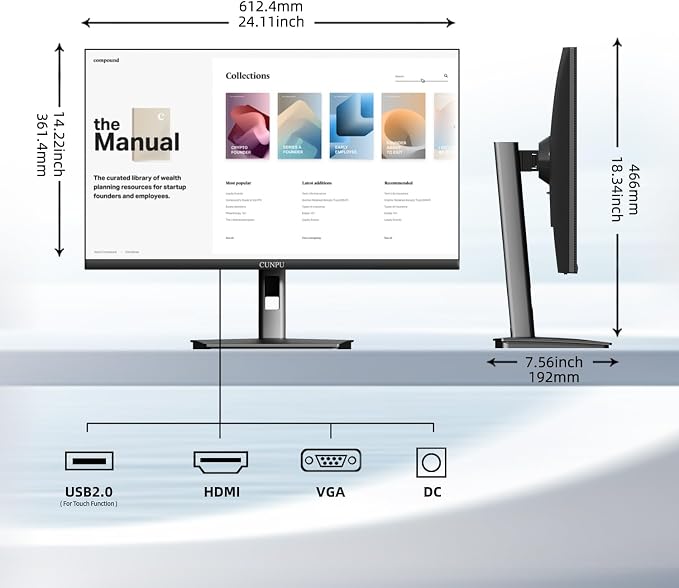
- FHD Monitor : The CUNPU 24-inch FHD monitor Features 178° full viewing angle, 75 Hz refresh rate, 1000:1 contrast, 220 cd/m² brightness, 100% sRGB, and 16.7M colors. This provides accurate and vibrant colors that are ideal for work and video viewing. The monitor's blue light reduction and flicker-free technology ensures a comfortable visual experience and reduces eye strain.
- Responsive Touchscreen Monitor: The 24" touchscreen monitor feature 10-point capacitive touch provides seamless productivity at your fingertips. The touchscreen is designed for smooth navigation and interaction with content, as well as control of the display.
- HDR Technology & Tilt Adjustment: HDR10 mode provides deeper and more realistic colors, offering a superior visual experience. The 100*100 mm VESA and tilt-adjustable integrated design makes the touchscreen HDMI monitor an optimal travel companion for laptops and workstations, serving as a second screen to enhance work productivity.
- Versatility and Connectivity: The 24-inch touchscreen monitor is equipped with a standard HDMI port, VGA and USB port (for connecting a mouse or keyboard). It can be connected to a range of devices, including PCs, mobile phones, laptops and workstations.
- 10 Points Touch Screen Monitor: use multiple fingers to zoom in & out of images and make notes and notes on images or documents no driver required and no need stylus.
- NOTE: To enable the touch feature, connect the monitor to your PC using the bundled USB-B and HDMI cable. MacOS is not supported at this time.
Product description
Touch stops working after sleep/wake?
Why does the touchscreen stop working when I connect via HDMI or VGA?
Which devices support touchscreen functionality?
Why does the touch response appear on my laptop screen instead of the CUNPU 24" touchscreen monitor?
CUNPU Bussiness Monitor Comparisons
Annotate documents easily and move around with simple taps, swipes, slides, and pinches.
NANO IPS Panel with true - to - life colors. Perfect for working efficiently.
Exceed industry color standards. Create high-quality, vibrant images and video.
The ultra-narrow 11mm design on three sides delivers a nearly borderless visual experience.
Easy to connect to PC,laptop and Work Station
It’s compatible with any 100*100 mm VESA wall mount, desk mount, stand, or articulating arm.
DC dimming technology, low blue light setting, warm light source for long term use.
The built?in stand provides 30 degrees of smooth, effortless tilt.
Touch stops working after sleep/wake?
Windows disables USB devices to save power. Go to Device Manager → Universal Serial Bus controllers → USB Root Hub → Power Management and uncheck "Allow the computer to turn off this device to save power."
Why does the touchscreen stop working when I connect via HDMI or VGA?
HDMI/VGA transmits only video signals. For touch, connect a USB-A to USB-B cable from your PC to the monitor's USB-B port. Ensure it's securely plugged and the PC recognizes the monitor as a touch device. If not, check drivers or touch settings.
Which devices support touchscreen functionality?
When the monitor is connected to a Windows PC or mini PC, it supports multi-touch functionality.
This feature is not supported when connected to a MacOs,smartphone, tablet, game console (PS, Xbox, Switch), TV stick, or when using a capacitive stylus.
Why does the touch response appear on my laptop screen instead of the CUNPU 24" touchscreen monitor?
Windows: Go to Control Panel > Hardware and Sound > Tablet PC Settings > Setup to map touch to the portable monitor.