CoreDrive
Computer Speakers for Desktop PC Monitor USB Plug-in Wired Computer Soundbar for PC Laptop Speakers with Adaptive-Channel-Switching Loud Sound Deep Bass USB C Adapter Easy to Clip on Monitor
Computer Speakers for Desktop PC Monitor USB Plug-in Wired Computer Soundbar for PC Laptop Speakers with Adaptive-Channel-Switching Loud Sound Deep Bass USB C Adapter Easy to Clip on Monitor
Couldn't load pickup availability
- [COMPATIBLE WITH USB DEVICES] - Our USB Speakers are compatible with Windows, macOS, ChromeOS, and Linux, making them ideal for PC, laptop, and desktop computer. Incompatible Devices: Monitors TVs and Projector. - [COMPATIBLE WITH USB-C DEVICES] - Thanks to the built-in USB-C to USB Adapter, our USB-C speakers are now compatible with devices that only have USB-C interface, such as the latest MacBook, Mac mini, iMac, iPad, Android phones, and tablets. - [INCREDIBLE LOUD SOUND WITH RICH BASS] - Our small computer speaker is equipped with dual ultra-magnetic drivers and dual passive radiators, providing high-quality stereo sound with powerful volume and deep bass for an incredible audio experience. - [ADAPTIVE-CHANNEL-SWITCHING WITH G-SENSOR] - Ensures the left and right sound channels remain correctly positioned whether the speaker is clamped to the top or bottom of your monitor. - [CONVENIENT TOUCH CONTROL] - Three intuitive touch buttons on the front allow for easy muting and volume adjustment. - [CLIP-ON MOUNTED, SAVING DESKTOP SPACE] - The monitor mount speakers can be easily clamped to the top, side, or bottom of monitors, helping you save desktop space. Additionally, the patented clamp also allows smooth placement on your desk. - Notice: Please make sure the audio driver of computer sound card is up to date and the USB interface of your computer can work properly. Please check out the computer's audio settings and volume mixer, and switch playback devices correctly.
Product description
Computer Speakers for Desktop PC Monitor
Clip-on Mounted | Desktop Mounted
Incredible Loud Sound with Deep Bass
Adaptive-Channel-Switching
Wide Compatibility
Frequently Asked Questions (FAQ)
The Reasons for Choosing This Computer Speaker:
1>Equipped with dual ultra-magnetic drivers for stereo loud sound.
2>Enhanced bass with dual front-facing passive radiators.
3>Very easy to clip onto monitors ranging from 0.1inch to 1.0inch in thickness.
4>Intuitive touch buttons on the front allow for easy muting and volume adjustment.
5>Compatible with USB Devices, including Windows, macOS, ChromeOS PCs, laptops, and desktop computers. Incompatible Devices: Monitors, TVs and Projector.
The Most Important Reasons:
6>Built-in G-Sensor for Adaptive-Channel-Switching.
7>Built-in USB-C to USB Adapter expands the compatibility with USB-C devices, including new MacBook, Mac mini, iMac, iPad, Android phones, and tablets.
Very Easy to Clip on Monitors
The monitor mount speakers can be easily clamped to the top, side, or bottom of monitors, helping you save desktop space.
Also Support Desktop Mounted
The patented clamp also allows the speaker to be placed smoothly on your desk.
Convenient Touch Control
Three touch buttons on the front allow for easy muting and volume adjustment.
Package List
1 x Computer Speakers
1 x User Manual
Our small computer speaker is equipped with dual ultra-magnetic drivers and dual passive radiators, providing high-quality stereo sound with powerful volume and deep bass for an incredible audio experience. For the best experience, please remember to turn up the volume both on your device and within the app.
Specifications
>Sound Channel: 2.0 Stereo
>Rated Power: 6W (2*3W)
>Maximum Power: 8W (2*4W)
>Speaker Type: Ultra-Magnetic Drivers
>Speaker Size: 1.6 inch
>Bass Enhancement: Dual Passive Radiators
>Frequency Response: 80Hz - 20kHz
Built-in G-Sensor ensures the left and right sound channels remain correctly positioned whether the speaker is clamped to the top or bottom of your monitor.
Compatible with USB Devices
Our USB Speakers are compatible with Windows, macOS, ChromeOS, and Linux, making them ideal for PC, laptop, and desktop computer.
Compatible with USB-C Devices
Thanks to the built-in USB-C to USB Adapter, our USB-C speakers are now compatible with devices that only have USB-C interface, such as the latest MacBook, Mac mini, iMac, iPad, Android phones, and tablets.
Note: Monitor USB ports are unsupported. This PC-only speaker requires a direct connection to your desktop or laptop USB port to operate normally.
Important Notes Before Buying
>No Bluetooth wireless function.
>No built-in microphone.
>No AUX Jack, NOT compatible with TV, TV-box, projector, PS5, Xbox, Switch.
>Do not plug it into monitor USB port.
>Do not connect it to any USB docking station or hub.
>Not suitable for monitors thicker than 1 inch (2.5 cm).
Q: Does it work with the latest iPhone, iPad, Android phones and tablets?
A: The included USB-C to USB adapter delivers broad compatibility with USB-C portable devices such as new iPhones, iPads, Android phones and tablets. Please note that mobile devices limit power output to protect their USB-C ports, which may result in reduced speaker volume or intermittent audio playback pauses.
Q: Can this speaker work with TVs, TV boxes, projectors, Xbox or PStation consoles?
A: Unfortunately, it only works with computers. USB ports built into TVs, media boxes, projectors and game consoles cannot supply enough power to run the speaker, which will lead to weak maximum volume output.
Q: Can I plug this speaker into a USB hub?
A: We strongly advise against using any USB hub. Hubs often fail to deliver sufficient power to run the speaker, which may trigger audio problems including distortion, muddled sound, popping noises, or frequent audio cutouts at high volume. For stable performance, connect the speaker directly to the rear USB ports of your PC tower instead.
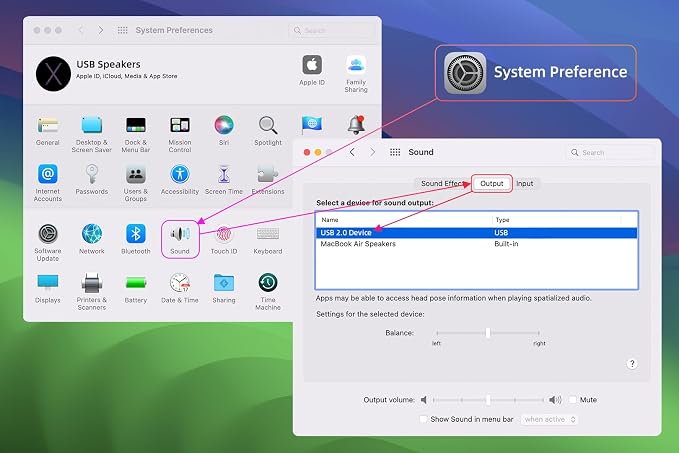
Q: Why does the speaker fail to work after plugging in?
A: First, confirm your PC’s sound card audio drivers are fully updated and the computer USB port functions normally.
Head to Settings > System > Sound, then select this “USB Speaker” from the Output device dropdown list.
Next, click the speaker icon on your taskbar and raise the main volume slider. Finally, open the volume mixer to verify no individual apps are muted or set to low volume.
Q: Does this speaker come with a built-in microphone?
A: This speaker has no built-in mic. We recommend using an external desktop microphone for video calls. Head to System > Sound > Input Device and select your external mic as the audio input source.
Q: Can I use this speaker without clipping it onto a monitor?
A: Absolutely. The included clip design also lets you place the speaker flat on your desk for desktop placement.
Share