- 【Full HD 1080P Webcam for Clear Video Calls】 KEMEIV C26 computer camera for desktop delivers clear 1920 × 1080 video with stable fixed focus at typical calling distances, helping avoid repeated focus changes during meetings. The 105° FOV captures one person, multiple participants, or more of the room, making it a practical web camera for desktop computer work, presentations, online classes, family calls, and streaming.
- 【Built-In Noise-Reducing Microphone】 This webcam with microphone helps reduce common background sounds and capture speech more clearly during calls and recordings. No separate desktop microphone is required. For proper audio, select “KEMEIV C26” as the camera and microphone in Zoom, Teams, or your computer settings. A convenient computer camera with microphone for remote work, video interviews, teaching, webinars, and everyday conversations.
- 【Automatic Light Adjustment】 Auto Light Correction helps adjust brightness and improve visibility in dim rooms or uneven indoor lighting. This 1080P camera for computer use is designed to produce a clearer and more natural-looking image for daytime meetings, evening calls, online learning, and live streaming. For the best video quality, face a soft light source and avoid extremely dark rooms or strong backlighting.
- 【Plug-and-Play USB-A with Included USB-C Adapter】 The fixed USB-A cable connects directly to most desktop computers, laptops, all-in-one PCs, and mini PCs. For a compatible USB-C computer, attach the included USB-A to USB-C adapter. This plug-and-play USB webcam requires no drivers or downloads?connect it, select the C26 in your video app, and start calling. For stable performance, connect it directly to a computer USB port, as some low-power hubs may affect video transmission.
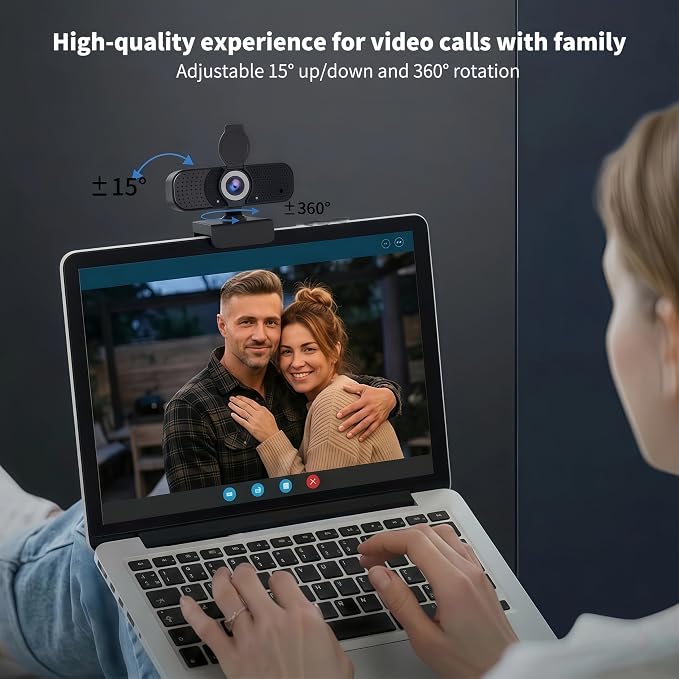
- 【105° FOV, Flip Privacy Cover and Flexible Mounting】 The 105° wide field of view fits individual calls, small-group meetings, presentations, and online teaching without constant camera repositioning. Flip the built-in physical privacy cover over the lens when the webcam is not in use. The camera supports 360° horizontal rotation, 35° tilt, a 180° expandable clip base, and a standard 1/4-inch tripod thread. Mount it on a screen or use the included mini tripod for flexible desk placement.
- 【High Compatibility and Multiple Applications】 This webcam for PC and Mac is compatible with Windows and macOS computers and popular platforms including Zoom, Microsoft Teams, Google Meet, Skype, OBS, Twitch, YouTube, and FaceTime. Use the C26 computer camera for remote work, video conferencing, online classes, webinars, streaming, content creation, interviews, and family calls. Enable camera and microphone permissions and select C26 in the app before use. Designed for computers; not intended for phones, tablets, or game consoles.
Product description
Choose the KEMEIV webcam that best suits your needs
Is this webcam plug and play?
How is the video quality?
Does this webcam work well in low light?
Is this webcam suitable for remote work and online classes?
Does this webcam come with a tripod?
Upgrade your calls with the KEMEIV C26 1080P Webcam. Featuring Full HD video, dual noise-cancelling microphones, automatic light correction, and plug & play USB setup, it delivers clear, professional video for meetings, streaming, and online classes on Windows and Mac.
Is this webcam plug and play?
Yes. Simply connect the webcam via USB and start using it instantly without installing drivers or software.
How is the video quality?
The KEMEIV C26 delivers true 1080P HD video quality with sharp details and natural colors. For the best and most stable video performance, we recommend connecting the webcam to a USB 3.0 port whenever possible.
Does this webcam work well in low light?
The CMOS sensor, combined with automatic light optimization, delivers clear and bright images even in low-light conditions.
Is this webcam suitable for remote work and online classes?
Absolutely. It is designed for video conferencing, online learning, remote work, and everyday communication.
Does this webcam come with a tripod?
Yes. All versions include a free desktop tripod for flexible angle adjustment, perfect for video calls, streaming, and content creation.