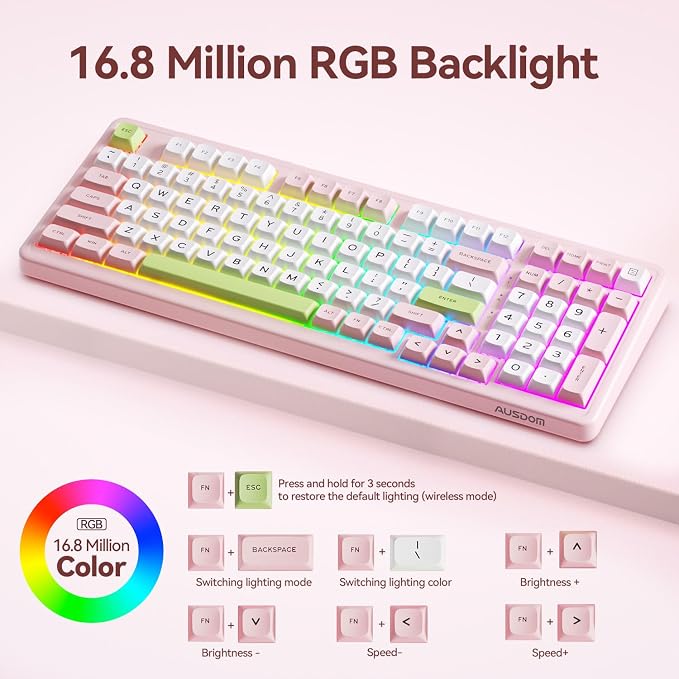
- Tri-Mode Connectivity & RGB Backlight: This Bluetooth mechanical keyboard offers 2.4GHz/USB-C/BT5.3 (3-device Bluetooth keyboard)- Compatibility across PCs, laptops, tablets, mobile phones. Customizable RGB lighting with 16.8 million colors is paired with durable double-shot PBT keycaps that ensure lighting effects for long-lasting visual brilliance. Perfect for gamers, coders, and professionals who demand lag-free performance and style.
- 6-Layer Gasket Structure & Low Latency: This wireless gaming keyboard features innovative 6-layer gasket structure. Combined with high-quality acoustic foam, effectively dampens vibrations and noise to provide a satisfying and comfortable typing experience. Equipped with AUSDOM’s proprietary DSP ultra-low latency technology, achieving an industry-leading 2ms response time. Perfect for competitive gamers who demand absolute precision and a tactical advantage.
- 4000mAh Battery & MDA Spherical Keycap: Powered by an 4000mAh battery, enjoy extended 32.99-hour backlit on or 300 hours without lighting. Experience premium comfort typing with MDA spherical keycaps cradling your fingertips and adjustable feet (6°-8° tilt) for optimal wrist positioning. This wireless mechanical keyboard delivers ultra-long battery life without compromising comfort or performance. Say goodbye to battery anxiety and wrist strain!
- Hot-swappable & Programmable: The hot-swappable mechanical keyboard features a single-slot PCB construction for enhanced stability and durability, and allows you to easily replace 3/5 pin switches without soldering. Take full control with software customization: remap keys, customize dynamic RGB lighting, and let RGB backlighting dance to your favorite beats. Perfect for DIY enthusiasts and professionals seeking ultimate customization.(Note: The user can only remap keys on Wired Mode and 2.4G Mode in the Windows system. Once it's done, the keymap will work on tri-mode.)
- Numpad & Function Keys: Enjoy seamless versatility with this classic mechanical keyboard, featuring a numpad and function keys in a space-saving design. Instantly switch between Windows & Mac modes, or toggle between Bluetooth, 2.4G, and wired connections with a single button. Boost efficiency with one-click calculator and screenshot shortcuts for smooth, lasting performance. Perfect for work, studying.Note: After unplugging, just switch to TPC to power off.
Product description
6-Layer Sound Foams
Quick Switch
MDA Spherical Keycaps
Shortcut Key Design
Two-stage Kickstand
Ergonomic Design
How do I reset the keyboard?
How do I fix an unresponsive key?
How to adjust RGB backlight?
How do I shut down the keyboard?
Can I customize the keyboard key settings? Such as adding "Page Up" and "Page Down" keys ?
6-layer sound-shock absorbing foams not only ensure every keystroke is incredibly soft, but also provide a better typing experience.
Instantly swap between Windows & Mac with one switch, and toggle between Bluetooth & wired & 2.4G mode with another. Achieve ultimate workflow efficiency without software hassle.
MDA keycaps' ergonomic spherical design and gradient height reduce finger strain by naturally contouring to your fingertips for comfortable typing.
Shortcut to Efficiency: One-touch access to home, print, and calculator. Streamline your workflow with instant-access function keys.
Adjust the dual legs to change the tilt angle of the keyboard to achieve a more comfortable state, improving comfort and enhancing keyboard stability.
Perfectly contoured 6-8° angle reduces wrist strain and promotes natural typing posture for all-day comfort.
How do I reset the keyboard?
Press and hold Fn+ESC for 3 seconds to restore to factory settings.
How do I fix an unresponsive key?
1. Restart the computer and reset the keyboard
2. Check if the keyboard battery is too low
3. Replace the data cable or computer port
4. Try to re-pair the device
How to adjust RGB backlight?
FN+BACKSPACE:Adjust Lighting Mode
FN+|\: Adjust Lighting Color
FN+: Adjust Brightness
FN+: Adjust Speed
FN+ESC: Restore initial default lighting
How do I shut down the keyboard?
Unplug the data cable and turn the switch to TPC to shut down.
Can I customize the keyboard key settings? Such as adding "Page Up" and "Page Down" keys ?
Yes, first download the H98 driver from the official website, then you can customize the functions you want for the existing buttons. The newly assigned function will overwrite the original function. (Setting only works in wired and 2.4G modes)