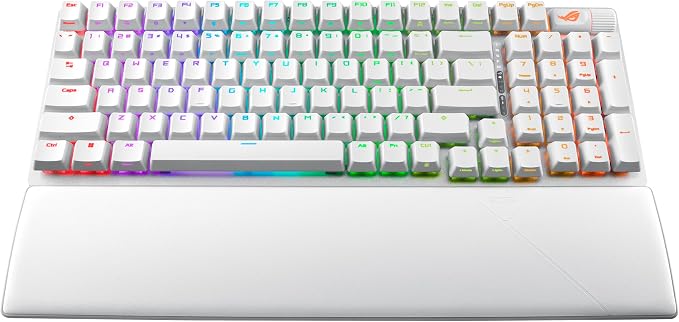
- 96% layout: Retains all function and number keys in a more compact and efficient layout that frees up desk space, with a form factor that is only 1 cm wider than a standard 80% keyboard
- ROG RX optical switches: Light actuated for consistent wobble-free keystrokes with near-zero debounce delay
- ROG-themed keycaps: UV-coated keycaps with special ROG elements for unique look
- Support ROG Polling Rate Booster: Achieves 8000 Hz polling rate and provides a 0.125 ms response time - up to 8X faster than other leading gaming keyboards
- Tri-mode connection: Connect using Bluetooth (up to three devices), 2.4 GHz with ROG SpeedNova wireless technology (up to 378 hours of battery life) or wired USB
- Sound-dampening foam: Unique, integrated dampening foam structure absorbs pinging noises and echoes for improved keystroke acoustics
- Enhanced typing experience: Pre-lubed keyboard stabilizers produce less friction for smoother keystrokes and stability for longer keys; durable ROG PBT doubleshot keycaps offer a premium feel and shine resistance
- Hotkeys: F1?F5 keys are pre-programmed as hotkeys for Xbox Game Bar and recording
- Intuitive controls: Multi-function button and multiwheel for media playback, volume, and keyboard lighting
- ROG Omni Receiver: Connect to multiple supported devices wirelessly with a single receiver. Ergonomic design: Three tilt positions and a detachable wrist rest
From the manufacturer
ASUS ROG Strix Scope II 96 RX Wireless Keyboard at a Glance
ROG RX Optical Switches
Compact 96% Layout
Sound-Dampening
Tri-Mode Connectivity
ROG Omni Receiver
Intuitive Control
Speed Tap Mode
PBT Doubleshot Keycaps
Stabilized Keys
What is the difference between ROG Strix Scope II 96 and ROG Strix Scope II 96 RX Wireless?
What are mechanical vs. optical switches?
What polling rate does the ROG Strix Scope II 96 RX Wireless support?
What is the battery life of the ROG Strix Scope II 96 RX Wireless?
How many devices can the ROG Omni Receiver connect at a time?
ASUS ROG Strix Scope II Bestsellers
Pre-lubed ROG RX Optical Switches offer consistent, wobble-free keystrokes with a superfast 1ms response and 100-million-keystroke lifespan. The ROG RX Red Low-Profile Switches enable fast input and prevent accidental keystrokes, to create instantaneous, smooth, and linear performance.
Retains all function and number keys in a more compact layout, with a form factor that is only 0.4 inches wider than a standard 80% keyboard
An integrated silicone dampening foam structure absorbs pinging noises and echoes for improved keystroke acoustics
Connect using Bluetooth (up to three devices), 2.4 GHz with ROG SpeedNova wireless technology (up to 387 hours of battery life), or wired USB
Enjoy simultaneous wireless connections to a keyboard and a compatible mouse via a single USB receiver, without compromising performance
The multi-function button and multiwheel allow users to control media playback, adjust volume, and tweak keyboard lighting.
Make directional changes in FPS games without releasing the previous key. Switch on Speed Tap mode for faster counter-strafing and more precise aim.
Get a premium feel with long-lasting durability with ROG PBT keycaps. Keys are also optimized with mid-height keycap and shorter stem to reduce wobble
Enjoy smooth and stable keystrokes with a specially tuned, lubricated switch stabilizer for longer keys such as the Spacebar, Shift, and Enter keys
What is the difference between ROG Strix Scope II 96 and ROG Strix Scope II 96 RX Wireless?
The ROG Strix Scope II 96 RX Wireless is a variation of ASUS ROG’s best-selling Strix Scope II 96 wireless keyboard, featuring the same compact 96% layout but with ROG RX optical switches instead of ROG NX mechanical switches.
What are mechanical vs. optical switches?
Mechanical switches use physical contact to register each keystroke, offering a familiar typing feel for many users. Optical switches use light-based actuation instead, which can feel smoother for some. The choice depends on personal preference.
What polling rate does the ROG Strix Scope II 96 RX Wireless support?
The keyboard supports a 1000 Hz polling rate by default and can reach up to 8000 Hz with the ASUS ROG Polling Rate Booster, which is also available on Amazon.
What is the battery life of the ROG Strix Scope II 96 RX Wireless?
With ROG SpeedNova wireless technology, the keyboard offers up to 378 hours of use in 2.4 GHz RF mode with RGB off. It also supports Bluetooth pairing with up to three devices, plus wired USB mode for charging and playing at the same time.
How many devices can the ROG Omni Receiver connect at a time?
One ROG Omni Receiver can pair with up to one compatible keyboard and one compatible mouse at the same time. If one keyboard and one mouse have already been paired, the pairing buttons in the “Add Pairing Device” section will be disabled.