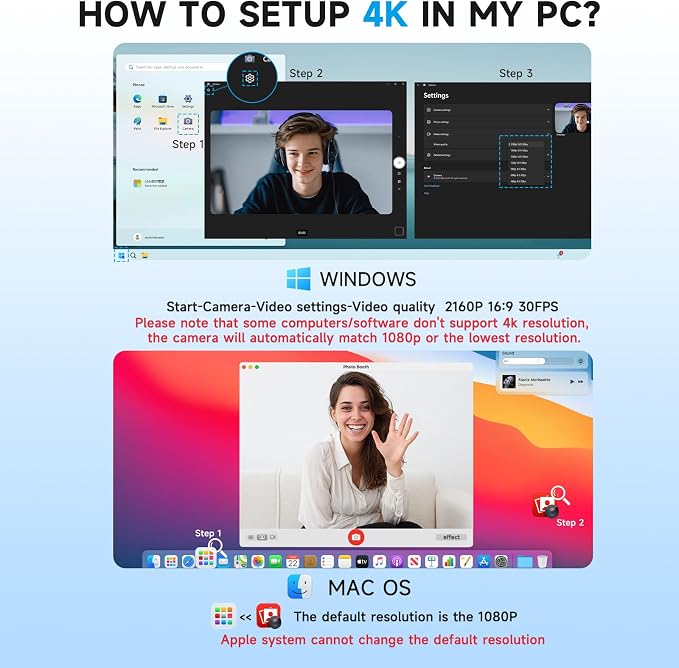
- 4K Ultra HD Video? Webcam:See every detail with crystal-clear 4K resolution. Experience incredibly sharp and lifelike video quality that makes you look professional on every call, ensuring you're always seen in the best light.
- ?Wide 90° Field of View & Full 360° Flexibility?:Fit everyone into the frame with the 90° wide-angle lens. Easily adjust your view with 180° tilt and 360° swivel rotation. Mount it securely on your monitor, desk, or tripod for the perfect angle every time.
- True Plug-and-Play Simplicity: No drivers, no fuss. Just connect the webcam to your computer via USB and you're ready to join calls in seconds. It offers seamless compatibility with all major platforms like Zoom, Teams, and Skype.
- Complete Privacy with a Physical Sliding Lens Cover: Worried about privacy? We've got you covered?literally. A built-in sliding lens cover physically blocks the camera when not in use, ensuring your private life stays private.
- Built-in Mic & Automatic Light Correction: Communicate clearly with the built-in noise-reducing microphone. The camera also intelligently adjusts the video brightness to make you look your best, even in poor lighting conditions.
- Universal Compatibility with USB-C & USB-A Adapter: Ready for modern and legacy devices. The included USB-A to USB-C adapter ensures you can connect to virtually any computer, laptop, or tablet for maximum versatility.
Product description
Is this webcam truly plug-and-play for both USB-C and USB-A computers???
How does the privacy cover and noise-canceling microphone work??
Does the 90° wide-angle lens work well for showing more than one person???
The video image is blurry, too dark, or has poor quality. How can I fix it???
How do I fix echo or background noise from the webcam's microphone???
Is this webcam truly plug-and-play for both USB-C and USB-A computers???
Yes. It's designed for simple plug-and-play setup. The included USB-A to USB-C adapter ensures compatibility with almost any modern or legacy computer, and no extra drivers are needed to start using it
How does the privacy cover and noise-canceling microphone work??
The built-in privacy cover is a ?physical sliding shield? that blocks the camera lens when not in use, providing unhackable security against unauthorized access
Does the 90° wide-angle lens work well for showing more than one person???
Absolutely. The ?90° wide-angle field of view (FOV)?? allows you to fit more into the frame, making it great for small group calls or showing a bit of your background
The video image is blurry, too dark, or has poor quality. How can I fix it???
Try these steps for a better picture:Improve Lighting: Ensure your face is evenly lit, avoiding strong backlighting from behind you Clean the Lens: Gently wipe the camera lens with a soft, lint-free cloth
How do I fix echo or background noise from the webcam's microphone???
Check Mic Position: Place the microphone farther from speakers and reflective surfaces to reduce echo Use a Headset: For the clearest audio, try using a headset or a dedicated microphone instead of the webcam's built-in mic