CoreDrive
Anker Laptop Docking Station 13-in-1 USB C Docking Station Triple Display | 2 HDMI and 1 DP 10Gbps USB-C and 5Gbps USB-A Data Ports Ethernet Audio SD/TF 85W Charging for Dell HP Lenovo and Mo
Anker Laptop Docking Station 13-in-1 USB C Docking Station Triple Display | 2 HDMI and 1 DP 10Gbps USB-C and 5Gbps USB-A Data Ports Ethernet Audio SD/TF 85W Charging for Dell HP Lenovo and Mo
Couldn't load pickup availability
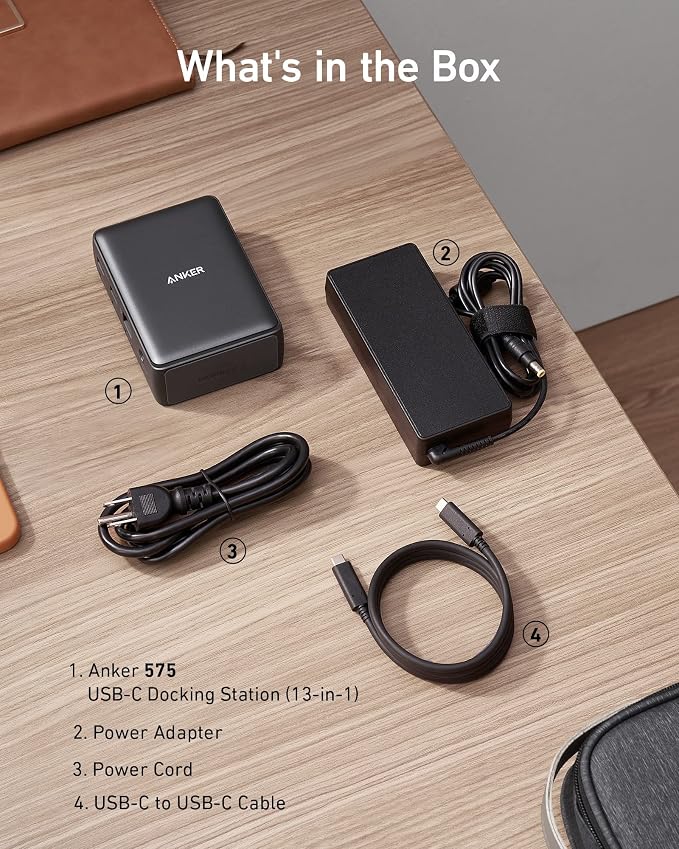
- Turn your laptop into a desktop workstation with 13 ports: 2× HDMI, DisplayPort, 3× USB-C (85W host, 18W PD, 10Gbps data), 3× USB-A 5Gbps, Gigabit Ethernet, SD/microSD, 3.5mm audio, and DC-IN ? all through a single cable. - Charge your laptop at 85W and your phone at 18W simultaneously. Includes a 135W power adapter for desktop-grade power delivery right out of the box ? no extra purchase needed. - Run up to 3 external monitors at 1080p@60Hz for expanded multitasking, or connect a single 4K@60Hz display via HDMI or DisplayPort. Transfer files at 10Gbps through USB-C and read SD cards at 104 MB/s for a power-user workflow. - Built for Windows: extended triple displays on Windows 10/11 and ChromeOS with MST. Works with Full-Functional USB-C, USB4, and Thunderbolt 3/4/5. Check USB-C DP Alt Mode and Power Delivery first. For Mac: charging/data work, but macOS limits monitors to mirror mode. - Backed by Anker ? a leading mobile charging brand trusted worldwide. Includes an 18-month warranty. Compact vertical design (4.9 × 3.5 × 1.6 in, 13.1 oz) saves desk space.
Product description
Frequently Asked Questions:
Comparison
Q1: Does this dock work with MacBook Air or MacBook Pro?
A: Charging and data work great. However, macOS limits all external monitors to mirror mode. If your workflow needs different content on each screen, use with a Windows laptop.
Q2: Can I run 3 monitors with different content? A: On Windows 10/11: Yes ? extend desktop across all 3 (1080p@60Hz per screen). On macOS: mirror only (macOS limitation, not dock limitation).
Q3: Will this dock work with my Dell/HP/Lenovo laptop?
A: Works with most modern Windows laptops (Dell XPS/Latitude, HP EliteBook/ProBook, Lenovo ThinkPad, Surface Pro, LG Gram) ? as long as USB-C port supports DP Alt Mode + PD.
Q4: How should I set up this dock for a home office?
A: Plug monitors into HDMI/DP, connect keyboard/mouse/printer to USB-A, plug in Ethernet, insert SD card ? then the included 3.3ft USB-C cable from the rear USB C port on the dock to your laptop. No drivers needed.
Q5: What makes this dock a better value?
A: Most budget hubs lack triple-display, Gigabit Ethernet, and SD slots. Anker 575 includes 135W adapter (a value others charge extra for). Backed by a globally trusted charging brand.
Q6: How does it compare to Thunderbolt docks? Thunderbolt docks offer 40Gbps ? ideal for 8K video editing. Anker 575 at 10Gbps handles office work, triple monitors, and SD transfers at a fraction of the cost.
13-in-1 USB-C Dock
13-in-1 USB-C Dock
9-in-1 USB-C PD Dock
13-in-1 Thunderbolt 3Dock
Share