CoreDrive
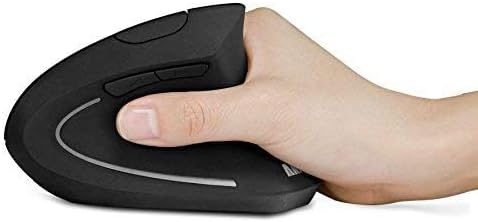
Anker 2.4G Wireless Vertical Ergonomic Optical Mouse for Work Multi-Device Connectivity 800/1200 /1600 DPI 5 Buttons for Laptop Desktop PC - Black
Anker 2.4G Wireless Vertical Ergonomic Optical Mouse for Work Multi-Device Connectivity 800/1200 /1600 DPI 5 Buttons for Laptop Desktop PC - Black
Couldn't load pickup availability
- Experience enhanced comfort and productivity with the Anker 2.4G Wireless Vertical Ergonomic Optical Mouse. Its scientifically designed ergonomic structure promotes a healthy neutral "handshake" wrist and arm position, reducing strain and amplifying your productivity.(Uses 2.4 GHz wireless via a USB receiver, not Bluetooth.) - Enjoy superior sensitivity and precision with this wireless mouse. It boasts 800/1200/1600 DPI Resolution Optical Tracking Technology, offering more sensitivity than standard computer mice. This ensures smooth and precise tracking on a diverse range of surfaces, making it ideal for both work and leisure activities. - The Anker Ergonomic Mouse is not only convenient but also user-friendly. It comes with next/previous buttons for effortless webpage browsing, making it an excellent choice for internet enthusiasts, gamers, and those who spend prolonged periods on their computer. - This computer mouse is not just ergonomic but also energy-efficient and durable. It transitions into a power-saving mode after 8 minutes of inactivity, entirely disconnecting power. A simple press of the right or left button wakes it up. Product dimensions: 120*62.8*74.8 mm; product weight: 3.4 oz. - The package offers a comprehensive set and warranty. It includes: 1 Anker Wireless Vertical Ergonomic Optical Mouse (2 AAA batteries not included), 1 2.4G USB receiver (stored in the mouse's bottom), 1 instruction manual. We extend an 18-month hassle-free warranty for your peace of mind.
Product description
The intersection of class, comfort and functionality. A mouse for the 21st century.
Note:
This is a right-handed mouse.
Any USB 3.0 port or device may cause interference with Bluetooth devices like your mouse. Please use the host port of your computer or a USB 2.0 connection, or use a USB 2.0 extension cord to move the wireless mouse away from the USB 3.0 devices.
Share