CoreDrive
AGEEN 14-Port 10Gbps USB-C Hub for iMac 24 inch 2021/2023/2024 M1/M3/M4 5 USB-A & 2 USB-C 3.2 Ports 4K@60Hz HDMI 1Gbps Ethernet SD/TF Card Slot M.2 NVME SSD Slot (SSD Not Included)
AGEEN 14-Port 10Gbps USB-C Hub for iMac 24 inch 2021/2023/2024 M1/M3/M4 5 USB-A & 2 USB-C 3.2 Ports 4K@60Hz HDMI 1Gbps Ethernet SD/TF Card Slot M.2 NVME SSD Slot (SSD Not Included)
Couldn't load pickup availability
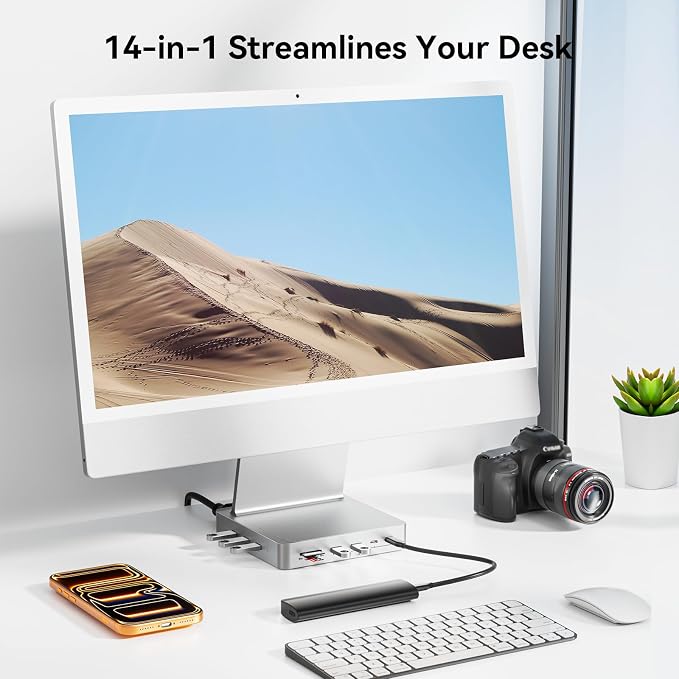
- 【14-in-1 Multifunctional Extension】AGEEN 14-in-1 10Gbps iMac USB-C Hub expands your 2021/2023/2024 24 inch iMac ability with 5*USB-A 3.2 ports, 2*USB-C 3.2 ports, 2*USB-A 2.0 ports, 4K@60Hz HDMI port, RJ45 Gigabit Ethernet port, SD/TF card slot, DC 5V port, M.2 NVME SSD enclosure.????Note: This product is made of plastic. - 【Built-in M.2 NVME SSD Enclosure】With support for max 8TB SSD, this imac accessories is a perfect storage solution. It supports 2230/ 2242/ 2260/ 2280 M.2 SSD.????Note: New SSD needs to be initialized. SSD Card Not Included. It does not support SSD cards in NGFF & SATA format. - 【10Gbps USB-C & USB-A Data Transfer】This iMac Docking Station can synchronize data through 5 USB-A & 2 USB-C 3.2 ports while 10Gbps data bandwidth, can transfer and backup data for your external devices easily and efficiently. Compatible with USB Type-C devices such as laptops, SSDs, mobile phones, and tablets. - 【4K@60Hz HDMI Visual Feast】4K UHD (3840x2160@60Hz) HDMI port, easily connect your Apple iMac to a larger high-resolution display for better image, and video output, sharing content without any converter dongle. Conveniently enjoy seamless mirroring or extended displays with sharp visuals and fluid motion ideal for content creation, editing, or streaming. - 【Up to 1 Gbps of Wired Gigabit Ethernet】The USB C to gigabit ethernet adapter enables steady connections of up to 1 Gbps, making this iMac USB Hub an ideal solution for buffering online gaming, data transfer, and video conferencing. - 【DC 5V Power Supply】The DC 5V power interface provides dedicated power for the connected devices to avoid slowing down or interrupting device operation due to insufficient power supply. ????Note: Plug the included charging cable into the hub’s DC 5V port and any available rear port on your iMac to ensure stable performance for all connected USB peripherals. - 【Designed for 24-Inch iMac 2021/2023/2024】Exclusively designed for iMac (24-inch) M1/M3/M4 models to add extra data storage space, extend your USB ports for fast data transfer and access to peripherals ? all with a plug-and-play design. In addition, the USB-C docking station also supports Mac mini M4 to extend data transfer interfaces. ????Note: It is a plastic product and does not fit 2020 and earlier models.
Product description
Does this product support DisplayPort?
Is it compatible with the 2020 iMac?
Does it support SATA SSDs?
What is the function of the charging cable in the package? And how to use it?
Why can the upstream port of the DS005 only be connected to the thunderbolt interface at the back of the iMac?
All-in-One Solution: With high-speed data transfer, SSD storage, and video output, this docking station is built for professionals in design, media, engineering, or any field where performance and multitasking are crucial. It is the ideal companion for iMac users who rely on a multitude of devices.
Does this product support DisplayPort?
No, it only supports HDMI.
Is it compatible with the 2020 iMac?
No, it only supports the iMac 24 inch 2021/2023/2024.
Does it support SATA SSDs?
No, it only supports M.2 NVMe SSDs. When using SSD, it is advisable to insert the SSD into the product first and then connect the cable to the iMac interface. When removing the SSD, it is better to unplug the cable first and then remove the SSD.
What is the function of the charging cable in the package? And how to use it?
If you're connecting multiple or high-power USB devices, please use the included cable to connect the hub's DC 5V input port to any USB-C port on the back of your iMac. This provides supplemental power to ensure stable operation.
Why can the upstream port of the DS005 only be connected to the thunderbolt interface at the back of the iMac?
Because only the Thunderbolt interface can provide video signal transmission, ensuring that the HDMI and other functions of the DS005 work properly.
Share