CoreDrive
AGCUT for Moto G Power 5G 2024 Screen Replacement for Moto G Power 2024 LCD Display XT2415 XT2415-1 LCD Digitizer Touch Screen Assembly Repair Part
AGCUT for Moto G Power 5G 2024 Screen Replacement for Moto G Power 2024 LCD Display XT2415 XT2415-1 LCD Digitizer Touch Screen Assembly Repair Part
Couldn't load pickup availability
- 【Parameters】For Moto G Power 2024 LCD screen replacement, 6.7 inches, 1080x2400 pixels, please confirm your phone model before purchasing. - 【Strict Quality Control】All for Moto G Power 2024 LCD replacement are strictly QC tested before shipment, 100% intact. Make sure for Moto G Power 2024 replacement screen are no scratches, no dead zones, no dot pixels or lines on the screen. High color saturation, high resolution, wide color gamut and smooth hand feel. - 【Application】Used to replace the defective LCD display touch screen digitizer assembly for Moto G Power 2024 . Examples include incorrect screen response, display issues, pixel distortion, cracked LCD screen, wrong colors, old or frozen LCD. - 【Perfect Quality Screen】For The Moto G Power 2024 LCD display has high brightness, high pixel, bringing you a clearer and more colorful screen world, and enjoy the original visual experience. - 【Installation】Product does not include installation instructions. Please test for the motorola moto g power 5g lcd before installation to ensure the normal use of the XT2415 screen replacement. Non-professional installation is not recommended. If you need help and an installation instruction video, It is recommended that you watch the installation video on YouTube.
Product description
Our Screen Is High Quality LCD Display Touch Screen Digitizer Assembly Replacement Kits For Moto G Power 2024 5G
for Moto XT2415 LCD Display
Solving Your Problems
Product Features
for Moto Moto G Power 2024 5G lcd screen
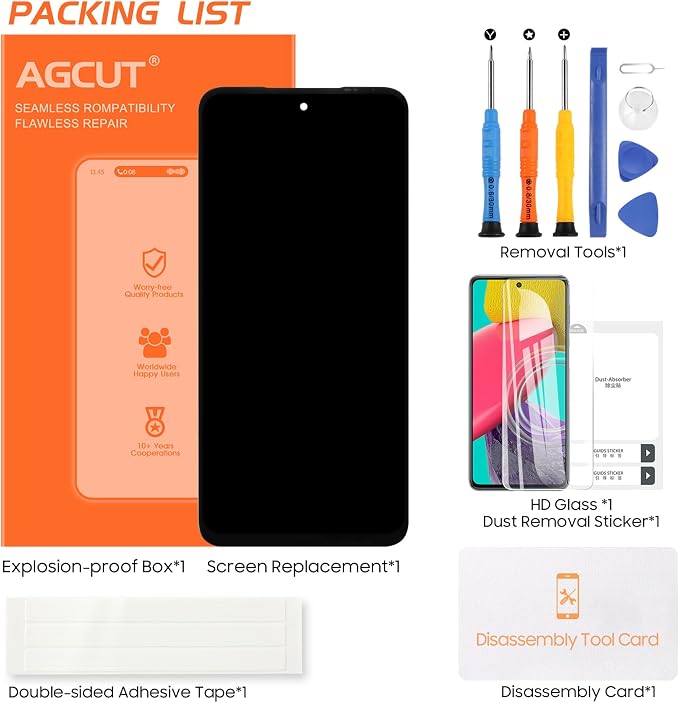
1x dust removal sticker
1x free tape
1x a set of special removal tools for Moto G Power 2024 5G screen replacement
3x screwdrivers
1x plastic dredger
2x blue open shell fragments
1x Card Pin,
1x suction cup
1. Turn off the power of your cell phone before installation.
2. We recommend a professional installer to do the installation; if you want to try to do it by yourself, you can consult a professional at a repair store
3. Do not bend the cables. During installation and testing, make sure the LCD cable is not bent!
4. Connect the cables in the correct locations. Test the screen after connecting all cables to the screen
With excellent color saturation, it brings you natural dazzling colors.
After replacing this screen, you can see the world more clearly and colorfully on the screen and enjoy the original visual experience.
This screen is highly sensitive and responsive, bringing you a different gaming experience.
Share