CoreDrive
9.2 PC Case LCD Display Computer Hardware Monitoring Screen for CPU GPU RAM Temp. Internal USB Monitor for Gaming PC
9.2 PC Case LCD Display Computer Hardware Monitoring Screen for CPU GPU RAM Temp. Internal USB Monitor for Gaming PC
Couldn't load pickup availability
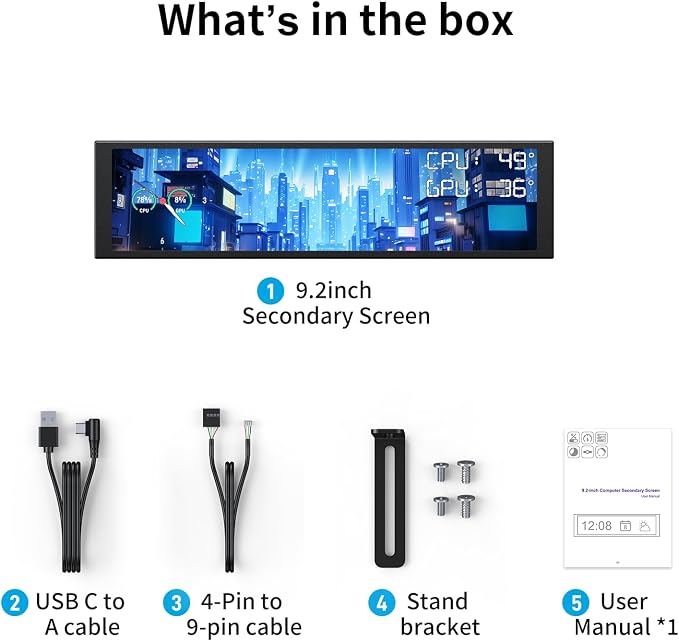
- Plug & Play Hardware Monitoring: Monitor CPU/GPU/RAM usage and temperature, time, network speed and more via the included USR software. No GPU port needed power and data transfer over a single USB cable - Versatile Mounting with Included Stand: Comes with a multi-angle stand that supports both landscape and portrait orientation. Mount it inside your PC case by screw or place it upright on your desk no magnetic adsorption required - App-Powered Custom Themes: Create your own style with static wallpapers, dynamic video backgrounds, and adjustable sensor layouts. Access massive online theme library and hotkey switching for theme rotation - One-Cable USB Connection: Integrated 4-pin to 9-pin + USB Type-C adapter cable handles both power and data. True plug-and-play without extra HDMI or power adapter - Crisp 1920x462 IPS Display: 9.2-inch IPS panel with anti-scratch glass, 1920462 resolution with unique aspect ratio, 60Hz refresh rate for sensor panels sharp and eye-friendly viewing experience - System Compatibility Requirements: This item only supports Windows 7 64-Bit or above System, does not support Mac, Linux, or Chrome OS. This PC case screen cannot be used as an extended screen for your PC, only as a sensor display - Complete Package Contents: Includes 9.2-inch LCD Screen, 4-pin to 9-pin Cable, USB-A to Type-C Adapter Cable, Multi-angle Stand, Screws & Adhesive Pads Kit, and User Manual for easy setup - Premium Build Quality: Features aluminum alloy frame with anti-fingerprint back cover for clean cable management and tidy internal wiring within your PC case setup
Product description
YinkerTech Livestreaming and Gaming Gear
Does this screen require an HDMI port or external power adapter?
Can I monitor my CPU/GPU temperature and usage on this display?
Does it support dynamic backgrounds like videos or GIFs?
How do I install the screen ? can I use it in portrait mode or place it on my desk?
Can I switch between different themes quickly?
Does this screen require an HDMI port or external power adapter?
No. It connects via a single USB cable (4-pin to 9-pin or USB?C), which handles both power and data. No HDMI or extra power brick is needed ? true plug?and?play.
Can I monitor my CPU/GPU temperature and usage on this display?
Yes. The included USR software lets you create a custom sensor panel with real?time readings for CPU/GPU temperature, load, RAM usage, fan speed, network speed, and more. It works like a dedicated hardware monitor inside your PC case.
Does it support dynamic backgrounds like videos or GIFs?
Absolutely. You can upload your own videos, GIFs, or images as animated backgrounds. Combine them with live hardware sensor overlays for a unique, eye?catching dashboard.
How do I install the screen ? can I use it in portrait mode or place it on my desk?
The screen comes with a multi?angle stand that supports both landscape and portrait orientation. You can mount it inside your PC case using screws, or simply stand it upright on your desk.
Can I switch between different themes quickly?
Yes. You can set up multiple themes (static, dynamic, sensor layouts) and switch them instantly using a keyboard hotkey. You can also enable theme rotation ? the screen will automatically cycle through your preset themes at your chosen interval.
Share