CoreDrive
8K60Hz 4K120Hz HDMI KVM Switch 1 Monitor 3 Computers USB3.0 3 Port KVM Switch with 4 Port USB 3.0 Hub for 3 PCs Share 1 Set of Keyboard Mouse and 1 Monitor
8K60Hz 4K120Hz HDMI KVM Switch 1 Monitor 3 Computers USB3.0 3 Port KVM Switch with 4 Port USB 3.0 Hub for 3 PCs Share 1 Set of Keyboard Mouse and 1 Monitor
Couldn't load pickup availability
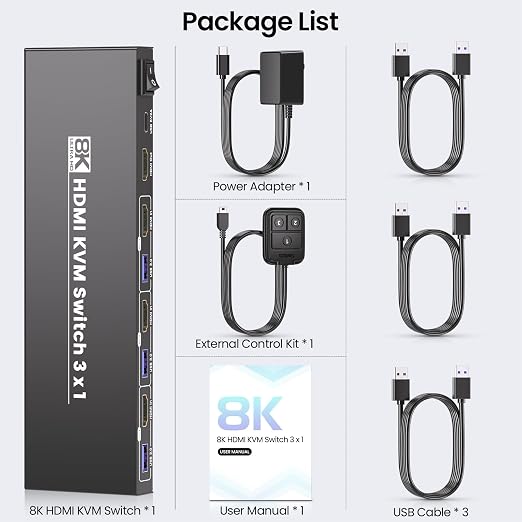
- 【HDMI KVM Switch 1 Monitor 3 Computers】Tired of juggling multiple keyboards and mice? This revolutionary 3 port KVM switch lets you control 3 computers with just 1 keyboard and 1 mouse while sharing a single monitor. The KVM switcher creates a clean, minimalist desk setup, making it the ideal tool for modern remote workers, streamers, and tech enthusiasts seeking workspace zen. - 【8K@60Hz 4K@120Hz Ultra HD Resolutions】This KVM switches supports stunning 8K@60Hz 4K@120Hz ultra HD resolutions. Experience crystal-clear visuals, vibrant colors, and sharp details that bring your work, games, and videos to life. Whether you’re editing high-definition graphics, streaming 8K movies, or engaging in immersive gaming sessions, this 3 computer KVM switch delivers fluid, lag-free imagery that meets the demands of even the most discerning users. Please note that to unlock the full 4K potential, ensure your computers, monitor, and HDMI cables are all 4K-compatible. - 【Integrated 4-Port USB 3.0 Hub】This KVM switch 1 monitor 3 computers features a built-in USB 3.0 hub with 5Gbps transfer speeds?10x faster than USB 2.0. The KVM switch allows sharing of high-speed external SSDs, printers, scanners, webcams and gaming controllers across all connected computers. Note: Connect PC1 PC2 PC3 USB ports to the KVM switch using included cables to activate USB hub functionality. - 【Dual Switching Methods for Maximum Convenience】 This versatile KVM switch offers two reliable switching options: front-panel push buttons and an included external wired controller. The 3 port KVM switch provides instant access to any connected computer without Hotkey switching, ensuring stable operation during critical tasks. The external controller features a 1.5m cable for flexible placement. - 【Plug and Play & Universal Compatibility】This HDMI KVM switches is plug-and-play ? no drivers, software, or technical setup required. Simply connect your computers, monitor, and peripherals, and you’re ready to start controlling three devices with one setup. It works seamlessly with Windows, m-a-cOS, and Linux operating systems, and is compatible with all HDMI-enabled computers, laptops, and monitors.
Product description
Transform Your Workspace with the 8K 3 Port KVM Switch - Control 3 Computers with 1 Monitor, Keyboard, and Mouse
8K@60Hz 4K@120Hz Ultra HD Support
USB 3.0 Connectivity
Easy Switching Methods( Note: no hotkey switching)
Easy Step-by-Step Connection
5V2A Type-C Power, Power ON/OFF & Active PC Indicators
This KVM switcher is designed to let you control 3 computers with a single monitor, keyboard, and mouse ? eliminating the need for multiple displays and peripherals, and turning your cluttered desk into a neat, efficient workspace. Whether you’re a remote worker juggling a work laptop and a personal PC, a gamer with a dedicated rig and a streaming device, or a professional handling graphic design, video editing, or data analysis across multiple computers, this HDMI KVM switches is the versatile solution you’ve been missing.
Note:
1. Please connect our KVM switch to the HDMI output port of the graphic cards of your desktops.
2. Please use the included USB cable to connect the USB port of each computer and the USB port of the KVM switch, otherwise the four USB 3.0 ports on the front of the KVM switch will not work.
This HDMI KVM switch 1 monitor 3 computers supports 8K@60Hz 4K@120Hz ultra HD resolution. Every image, video, and design will appear sharp, detailed, and vibrant, with true-to-life colors that make your work and entertainment more immersive.
This 3 computer KVM switch includes a 4-port USB 3.0 hub that transforms how you share devices. Plug your mechanical keyboard, gaming mouse, external SSD, and printer into this KVM switch, and access them from any connected computer instantly. The KVM switch's 5Gbps speeds mean no more waiting for file transfers or dealing with sluggish peripherals.
Use the KVM switch's front-panel buttons for direct control, or position the included wired controller exactly where you want it. This KVM switch 1 monitor 3 computers keeps switching simple?just press and go.
1. Connect the Monitor to the KVM Switch: Take an HDMI cable (supports 8K60Hz/4K120Hz) and plug one end into the “HDMI OUT” port on the KVM switch. Plug the other end into the HDMI input port of your monitor.
2. Connect 3 PCs to the KVM Switch: Use three separate HDMI cables to connect each of your computers to the KVM switch. Plug one end of each HDMI cable into the “HDMI IN 1/2/3” ports (corresponding to your 3 PCs) on the KVM switch, and the other end into the HDMI output port of each PC.
3. Connect Keyboard, Mouse & USB Devices: The KVM switch comes with a 4-port USB 3.0 Hub?perfect for expanding your connectivity. Plug your USB devices into any of the “USB 3.0 Hub” ports on the switch (they will be shared across all 3 PCs automatically).
4. Power the KVM Switch: This KVM switch features a 5V2A Type-C power supply?a stable and efficient power source that ensures smooth operation even when multiple USB devices are connected.
5. Turn On the Power: Locate the Power ON/OFF switch on the KVM switch.
6. Start Switching: Once all connections are done, you can switch between your 3 PCs effortlessly (via the front-panel button or external controller).
This 3 port KVM switch adopts a 5V2A Type-C dedicated power supply, providing sufficient and stable power to support the switch’s high-performance display output (8K60Hz/4K120Hz) and the 4-port USB 3.0 Hub.
The built-in Power ON/OFF switch adds extra convenience and safety. You no longer need to unplug the power cable to shut down the switch?simply flip the switch to “OFF” when not in use to save energy.
The 3 clearly labeled indicator lights (matching the 3 HDMI IN ports) take the guesswork out of switching. Whether you’re multitasking between work, gaming, and creative projects, the illuminated indicator instantly shows which PC is active?saving you time and avoiding confusion.
Share