- 【HDMI KVM Switch Dual monitor】This Dual monitor KVM switch allows you to effortlessly manage 2 computers to share 2 monitors and 4 USB devices. Supports expanded mode and mirror mode.The extended mode can output two different screens and the Mirror mode can output two identical screens.
- 【Ultra HD 8K Visual Effect】MLEEDA 2 monitors KVM Switch HDMI supports up to 8K@60Hz, 4K@144Hz resolutions and backward compatible with 4K@60Hz,4K@30Hz and 1080P,etc.
- 【HDMI KVM Switch with 4 USB 3.0 ports】USB 3.0 KVM switch 2 computers 2 monitors with 3 USB-A and 1 USB-C ports for sharing keyboard, mouse, USB-C external hard drive, etc, supports ultra-fast USB 3.0 data transfer up to 5Gbps.
- 【Great Compatibility & 2 Switching Mode】2 computers 2 monitors KVM switch driver-free for Windows, Mac OS, Linux and Chrome OS. Compatible with Desktops, Laptops, PS5/PS4. It is widely applied for home, office, games, etc.You can press the button on the panel or use the wired remote to switch the computers.
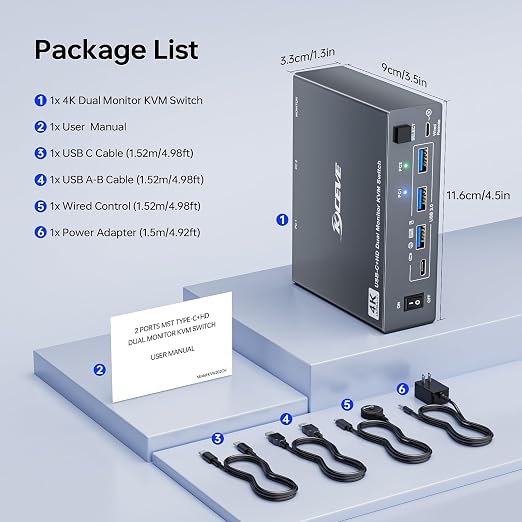
- 【What you will get】We provides 1 year wa-r-ranty for this 8K HDMI KVM Switch .?????????????? ????????:1* 8K 2 Monitor KVM switch; 2*USB 3.0 Cable(1.5M); 1*Wired Remote(1.5M); 1*Power adapter and 1*User Manual .Any problem,24-hour service for you.
Product description
KVM switch 2 monitors 2 computers HDMI
Demonstration video---Two switching methods and how to set output mode
HDMI KVM switch.
12V Power Adapter (Included)
Up to 8K@60Hz , 4K@144Hz
Wired Remote (1.5m)
ON/OFF Switch
A set of keyboard mouse controls two computers, sharing two monitors and USB devices, suitable for users with 2 computers and 2 monitors
Supports single computer output for 2 duplicate or independent displays at the same time.
Each computer requires 2 * HDMI cables and 1 * USB cable to connect to the KVM switch.
Windows OS: Press the shortcut key "WIN+P" and then select "Extension" or "mirror" below
Mac OS: Set [Mirror Mode]: Select [Apple Icon] [System Preferences], click [Display] [Arrange], and then check [Mirror Display];
Set [Extended Mode]: When [Mirror Display] is unchecked, "Extended Mode" can be achieved.
Make 2 monitors KVM switch work smoother and more stable when using high-power USB devices.
7680×4320@60Hz,3840×2160@144Hz providing an incredible viewing experience with realistic images and vibrant colors.
Tidy up desktop space by using the remote to switch 2 monitors between 2 computers.
Restart HDMI KVM with one click, no need to unplug and plug cables back and forth.