CoreDrive
8K@60Hz KVM Switch 2 Monitors 2 Computers Display Port KVM Switches Dual Monitor with 4 USB 3.0 Ports Sharing Keyboard Mouse Printer Computer Switch for 2 Computers Displayport Switch 2 in 2 Out
8K@60Hz KVM Switch 2 Monitors 2 Computers Display Port KVM Switches Dual Monitor with 4 USB 3.0 Ports Sharing Keyboard Mouse Printer Computer Switch for 2 Computers Displayport Switch 2 in 2 Out
Couldn't load pickup availability
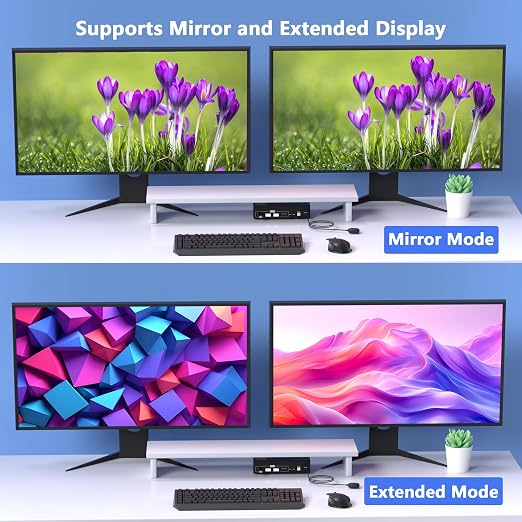
- 【KVM Switch 2 Monitors 2 Computers Display Port】This Display Port KVM switches allows you to input DisplayPort video signals and USB from two Computers and output them to two monitors, enabling you to share a dual-monitor setup across multiple PCs. It also features four USB 3.0 ports to share keyboards, mouse, printers, USB flash drives and other USB devices. You can easily switch between them with the press of a button. LED lights clearly show which computer is active.【Important Notes】Please make sure each of your computers has 2 Display Port, and 1 USB-A port and all ports are properly connected. Docking stations and additional adapter cables are not supported. - 【Supports High Resolution up to 8K@60Hz】This Display Port splitter for dual monitors supports up to 8K@60Hz and 4K@120Hz, and is backward compatible with 4K@60Hz and 1080P, allowing full use of high-resolution monitors and high-refresh-rate displays. Extend and mirror modes are supported, ensuring smooth motion and consistent image quality even when switching between PCs. (Note: To achieve maximum resolution, the PC, monitor, and DP cables must all support 8K@60Hz and that the cable length is less than 6.56 ft (2 m) for optimal performance.) - 【4 High-Speed USB 3.0 Ports】This Displayport Hub features four USB 3.0 ports, allowing up to four USB devices to be shared between two computers. In addition to keyboards and mouse, you can connect USB flash drives, printers, webcams, and more. With USB 3.0 support, data transfer speeds of up to 5Gbps are possible, making large file transfers faster and more efficient. It is also backward compatible with USB 1.1/2.0, ensuring older peripherals work seamlessly. - 【Two Ways of Switching】The KVM docking station offers flexible and convenient switching methods, including a physical button on the main unit and a wired desktop remote controller, making it easy to switch between two connected computers. The physical button ensures intuitive operation with minimal risk of accidental input and the wired desktop remote allows quick switching without touching the main unit. Please Note: Keyboard hotkey switching is not supported. - 【Wide Compatibility】This computer switch for 2 computers is compatible with most major operating systems, including Windows, Linux, and Chrome OS, and supports most DisplayPort source devices. In addition, This monitor switch for 2 computers features a high-dissipation metal casing, enabling stable operation at temperatures up to 50°C. The metal casing minimizes failure points, enhances long-term reliability, and ensures quiet, comfortable use even during continuous operation. - 【Important Notices】1. Please make sure each of your computers has 2 display port and 1 USB-A port, and that all ports are connected correctly. Docking stations and additional adapter cables are not supported 2. Each computer must support dual-display output simultaneously. Test method: Connect the computer directly to two monitors without using the KVM switch. 3.Many macOS laptops do not have the DisplayPort port, and therefore are not compatible with this product. 4.New monitors often have multiple DP input ports, please select the correct input source in the monitor settings. 【Package Contents】 KVM Switch×1, USB 3.0 Cable×2, USB Power Cable×1, Wired Desktop Controller×1, User Manual×1.
Product description
Find the Best KVM Switch for You
8K@60Hz DisplayPort KVM Switch 2 Monitors 2 Computers
This DisplayPort KVM switch allows you to connect two computers, each providing two DisplayPort inputs and one USB-A input. It enables two computers to share two monitors and four USB devices, making it ideal for dual-monitor setups.
Note: Please connect two DisplayPort (DP) cables and one USB cable to each computer, and make sure all ports are properly connected. DP cables are not included.
Docking station and additional adapter cables are not supported.
Make sure the power button on the KVM switch is turned on before use.
Ultra HD 8K@60Hz Resolution
Supports ultra-high resolutions up to 8K@60Hz and 4K@120Hz, delivering exceptional image clarity and smooth motion.
Note: To achieve 8K@60Hz resolution, the computer, monitor, and cable must all support 8K@60Hz. Please keep the cable length under 6.6ft.
KVM Switch HDMI 2 IN 2 OUT
KVM Switch HDMI DP 2 IN 2 OUT
KVM Switch DP 2 IN 2 OUT
Video Input/Output Port
HDMI Port
Video Input/Output Port
HDMI and DisplayPort
Video Input/Output Port
DisplayPort
Number of Supported Computers
2 Computer Input
Number of Supported Computers
2 Computer Input
Number of Supported Computers
2 Computer Input
Number of Supported Monitors
2 Monitor Output
Number of Supported Monitors
2 Monitor Output
Number of Supported Monitors
2 Monitor Output
Number of USB Devices
Supports 4 USB Devices
Number of USB Devices
Supports 4 USB Devices
Number of USB Devices
Supports 4 USB Devices
Resolution Support
Up to 8K@60Hz / 4K@120Hz
Resolution Support
Up to 8K@60Hz / 4K@120Hz
Resolution Support
Up to 8K@60Hz / 4K@120Hz
Share