CoreDrive
7 Inch LCD Touch Screen 1024x600 IPS Display with Stand HDMI Portable Monitor for Raspberry Pi 5/4B/3B+/3B/B+/Zero/400 BB Black Windows 10 8 7 Free Driver
7 Inch LCD Touch Screen 1024x600 IPS Display with Stand HDMI Portable Monitor for Raspberry Pi 5/4B/3B+/3B/B+/Zero/400 BB Black Windows 10 8 7 Free Driver
Couldn't load pickup availability
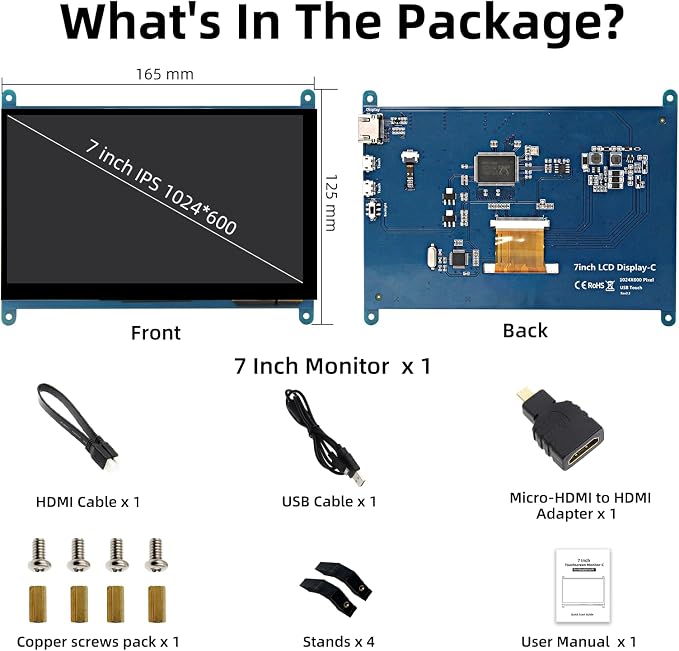
- 【Portable Monitor】The 7-inch Raspberry Pi screen comes with a 1024x600 resolution that can be configured through software settings to achieve a maximum configurable resolution of 1920X1080. - 【Wide Compatibility】The mini monitor is fully compatible with Raspberry Pi 5, 4, 3B+, 3B, 2B+, as well as BB Black, Banana Pi, Jetson Nano, and other mainstream mini computers. It can also be used as a universal small HDMI compatible screen for connecting computers, TV boxes, game consoles, or as a computer temperature monitor. - 【5-Point Touch】The capacitive touchscreen supports up to 5-point touch. It supports separate backlight control, allowing you to turn off the backlight to save power. No driver installation is required; simply connect the Raspberry Pi and the monitor via the Micro USB and HDMI ports to use it immediately. - 【Package Details】The package includes a 7-inch Raspberry Pi screen, HDMI adapter, Micro USB cable, Micro-HD adapter, 2 stands, and 4 screws for easy installation. If you have any questions about the package, please feel free to contact us. - 【Quality Assurance】All Raspberry Pi touchscreens undergo comprehensive testing before shipment. If you encounter any problems during use, please contact us.
Product description
When you use the capacitive touch screen, the display is normal but there is no touch function.
How to achieve driver-free installation?
Why can't I just plug and play?
Recommend Using Our Debugged Image to Avoid The Step of Installing The Driver
Plug and Play, No Driver Required
IPS Monitor
5 Points Touch
Second Screen Mode
Interface Description
Perfectly fits Raspberry Pi 5/4B
What's in the package?
When you use the capacitive touch screen, the display is normal but there is no touch function.
Check if one USB end connects to any of the Pi's four USB ports and the other to the LCD's USB Touch interface.
Connect the USB touch to the PC's USB port to check whether the computer can recognize it and whether the touch function works normally.
How to achieve driver-free installation?
Please download the Image of our built-in driver. Download url:lcdwiki.com/7inch_HDMI_Display-C
Why can't I just plug and play?
'Driver-free' typically means you can just plug in the USB and HDMI cables for immediate display and touch functionality. However, on a Raspberry Pi system, you usually need to modify the config.txt file to adapt to the optimal resolution.
User Manual & Image of built-in driver download: lcdwiki.com/7inch_HDMI_Display-C
IPS screens can provide more realistic colors and a wide viewing angle, ensuring a better experience when viewing the screen from different angles.
Multi-touch enhances user experience and makes operation more convenient and efficient.
(XP and older versions of the system: single-touch)
Supports mainstream mini PCs such as Raspberry Pi, BB Black, and Banana Pi. Supports PCs with HDMI ports.
1. HDMI Port - Connect using an HDMI cable to the signal source.
2&3. Micro-USB Port - For touch functionality and power supply.
4. Backlight Power Switch - Controls the backlight to turn on and off, saving power.
Used as a Raspberry Pi display, supporting Raspbian, Ubuntu, Kali-Linux, Kodi, Win10 IoT, single-touch, and driver-free.
We recommend downloading the debugged image, which offers plug-and-play functionality, ensuring perfect compatibility with the system. lcdwiki.com/7inch_HDMI_Display-C
Share