CoreDrive
512GB Touch Portable SSD for USB C Device (with No-Cost APP) Backup Encryption Fingerprint External SSD for iPhone 17/16/15 Android Mac/Win Laptop (Not for iPhones/iPad with Lightning Port)
512GB Touch Portable SSD for USB C Device (with No-Cost APP) Backup Encryption Fingerprint External SSD for iPhone 17/16/15 Android Mac/Win Laptop (Not for iPhones/iPad with Lightning Port)
Couldn't load pickup availability
- 【Touch Portable SSD for USB C Devices】: This Touch portable SSD is compatible with iPhone 15 / 16 / 17 series, Samsung, Google, and other USB-C phones and tablets, as well as PCs. Easily set up fingerprint and password encryption directly from your device.(Note: If you want to use it with Lightning devices, you'll need an additional Lightning-to-USB-C hub with a power delivery port.) - 【Advanced Security】: Unlock your SSD effortlessly with fingerprint or password authentication, giving you secure and convenient access at the touch of a finger. Unauthorized access attempts are automatically blocked?ensuring your data stays private and protected. Plus, with built-in brute force prevention, multiple incorrect password attempts will trigger an automatic lockout to safeguard your information. - 【512GB Storage Capacity】Running low on phone storage? This portable SSD can store up to 150,000 photos, allowing you to keep your precious memories without having to delete important files - Update Notice: Due to the launch of our new application, TurboSave, some mobile devices may not recognize the SSD because of system version differences. Installing the firmware update will resolve this issue. (If this issue occurs, Additional technical guidance from NewQ may be required.) - 【Privacy Guarantee】: Our app offers local encryption and secure file transfer with no email binding, registration, subscription fees, or reliance on cloud storage. Enjoy peace of mind knowing your privacy is fully protected?your data stays with you. Plus, connecting your SSD to a PC requires no additional software installation. Simply register your fingerprints using the mobile app beforehand (we recommend enrolling at least two fingerprints) for seamless and secure access. - 【Easy Backup App】Our app not only encrypts your external SSD but also organizes and backs up files seamlessly. Effortlessly transfer files from your mobile device to the SSD and automatically detect duplicates, saving on cloud storage costs - 【Ultra-Slim USB-C Hard Drive】Designed to be ultra-thin and as compact as your finger, this SSD is a perfect travel companion for business trips
Product description
NewQ Touch Portable SSD
Touch External Portable SSD
How to use the SSD to iphone
How to use the SSD to iphone/iPad with lightning port?
How to use the OTG?
How to use the OTG?
How to backup your phone files to the SSD?
How to backup your phone files to the SSD?
Points & Useful Advices
Fingerprint or Password Encryption
The APP is Recommended
Good Usage Habits
LED Status
Super Mini Design
1) Do I have to use my fingerprint for encryption? Can I still use it if I hurt my finger?
2) Does The APP collect user information? It's important.
3) How can I keep my data safe if I lose my SSD?
4) Does it support macbook? How about system compatibility? Will it be blocked by antivirus software?
5) I can't decrypt the SSD when connecting to another phone?
This fingerprint-encrypted SSD is perfectly compatible with the iPhone 15/16/17 series.
Lightning port iphones and ipads only have 2.0 transfer speeds, which is different from USB-C 3.0 transfer speeds;
If you want to connect the SSD with a lightning cable, it is recommended to use a lightning hub to obtain additional power, as the lightning cable cannot output enough power.
On iPhone or iPad, you can use the OTG function to switch the file directory of the SSD from the APP to the file management directory of the device.
You can use the “Phone” section to categorize your phone's files, such as videos, pictures, music, etc., and then transfer them to the SSD's custom folder, which is very easy to do.
The APP is just a local tool for transfer and encryption and just needs data permissions to read the SSD, please allow it.
Advantage: 1) No account registration required. 2) No cloud storage. 3) No fees required.
A Better Way To Protect Privacy
Set your password or fingerprint on your personal cell phone, no app on your PC and use only your fingerprint to unlock it, and in this way make your SSD more secure.(Note: You can register up to 10 fingerprints. We recommend at least 2.)
When the SSD is used with phone it is highly recommended to use with the APP for best compatibility across different system versions.
Clicking the Ejectan button instead of pulling out the SSD directly can effectively protect the performance of the SSD and prolong its service life.
Blinking blue LED when SSD is connected or working is normal status.
Red LED is abnormal status.
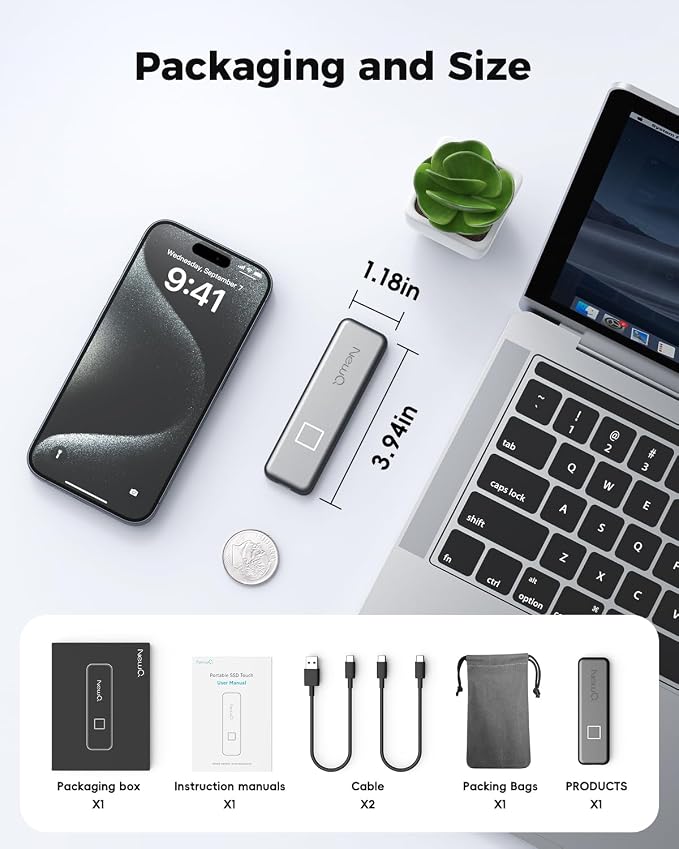
The SSD's extremely compact space design makes it a quarter of the size of a smartphone.
It couldn't be more portable, making it an excellent choice for office and outdoor use.
1) Do I have to use my fingerprint for encryption? Can I still use it if I hurt my finger?
Don't worry, you can set up to 10 fingerprints, and you can set password+fingerprint or only password on the mobile app, but on PC you can only decrypt using fingerprint.
2) Does The APP collect user information? It's important.
For the record, The APP does not collect any information, it's just a tool for transmission and encryption.4 points: 1) No account registration required. 2) No wifi required. 3) No cloud storage. 4) No fees required. It is a highly independent APP.
3) How can I keep my data safe if I lose my SSD?
The SSD is deeply encrypted, so even if someone violently removes the memory stick, it can't be accessed. And work with PC can only be accessed by fingerprint, no APP program, almost impossible to be decrypted by PC side.
4) Does it support macbook? How about system compatibility? Will it be blocked by antivirus software?
Support, in this point it is different from other brands of fingerprint hard disk, will not conflict with antivirus software, because there is no APP for PC, excellent compatibility.
5) I can't decrypt the SSD when connecting to another phone?
After installing the APP most likely can be solved, but some android phones may still be unable to read because of insufficient power consumption, recommended for iphones.
Share