CoreDrive
4K@60Hz HDMI KVM Switch 1 Monitor 5 Computers USB 3.0 5 Port KVM Switch for Controlling 5 Computers with 1 Set of Keyboard Mouse and 1 Monitor
4K@60Hz HDMI KVM Switch 1 Monitor 5 Computers USB 3.0 5 Port KVM Switch for Controlling 5 Computers with 1 Set of Keyboard Mouse and 1 Monitor
Couldn't load pickup availability
- 【5 Port HDMI KVM Switch】This 5-Port HDMI KVM Switch lets you control up to five HDMI-enabled PCs or servers with just one monitor, keyboard, and mouse?turning your cluttered workspace into a neat, high-performance hub. Note: you must use USB cables to connect the USB ports of computers and the KVM switcher, otherwise the 4 USB 3.0 ports on the front of the KVM switch will not work. - 【Ultra HD 4K@60Hz Resolutions】This KVM switch 1 monitor 5 computers is built for visual excellence, supporting up to 4K@60Hz resolution that makes every image, video, and game look its absolute best. This KVM switch is also backward compatible with lower resolutions, so you can use it with older monitors or devices without sacrificing functionality?it adapts to your gear, not the other way around. Pro tip: For the full 4K experience, make sure your computers, monitor, and HDMI cables are 4K-compatible?this kvm switch will handle the rest. - 【4-Port USB 3.0 Hub - Blazing 5Gbps Data Transfers】Equipped with 4 USB 3.0 ports, this KVM switches delivers data transfer speeds of up to 5Gbps?10x faster than outdated USB 2.0. That means moving large video files, photo libraries, or backup drives between your four computers takes seconds, not minutes. This 5 port KVM switch is fully backward compatible with USB 2.0 devices too, so you won’t have to replace your favorite gear? it works with what you already own. - 【Button Switching & IR Remote Controller Switching】Two convenient switching options let you toggle between computers in an instant: the front-panel push buttons for quick access, or the IR remote controller for added flexibility. Hotkey switching is not available, but these intuitive methods eliminate the hassle of cable management. - 【Plug and Play】This 5 computer KVM switch is true plug-and-play?no extra software or drivers required. Just connect your computers, monitor, and peripherals via HDMI and USB cables, and you’re ready to go. Its sleek, space-saving build fits perfectly in home offices, gaming setups, or professional workspaces, keeping your desk organized and your focus sharp.
Product description
5 Port HDMI KVM Switch 4K@60Hz - Control 5 Computers with 1 Monitor, Keyboard & Mouse + 4-Port USB 3.0 Hub
Manage 5 Computers with One Setup
4K@60Hz Ultra HD Visuals ? Crisp, Smooth, and Vivid
USB 3.0 Hub ? Blazing-Fast Transfers & Peripheral Sharing
Two Effortless Switching Modes ? Control at Your Fingertips
Connection Diagram
Power ON/OFF Switch & 5V2A Stable Power Supply
Let’s face it?managing 5 computers with separate monitors, keyboards, and mice is a nightmare of tangled cables, constant plugging/unplugging, and a cluttered desk that kills productivity. But this 5 Port HDMI KVM Switch is here to turn chaos into calm: it lets you control up to 5 computers with just one set of peripherals and a single monitor, all while serving up stunning 4K@60Hz visuals, blazingly fast USB 3.0 connectivity, and two hassle-free switching modes.
Whether you’re a creative professional, IT specialist, gamer, or remote worker juggling multiple devices, this KVM switcher adapts to your workflow and makes multi-computer management effortless.
Note:
1. Hotkey switching is not compatible with this KVM switches.
2. You’ll need to use USB cables to connect each computer’s USB port to this KVM switch?without this connection, the 4 front-panel USB 3.0 peripheral ports on the KVM switch won’t be functional.
The core power of this 5 computer KVM switch lies in its ability to unify your tech: connect 5 HDMI-enabled computers (or servers, consoles, and smart devices) to the KVM switches, then hook up your monitor, keyboard, and mouse?and boom, full control over all five devices.
No more crawling under your desk to swap cables, no more juggling multiple peripherals?this 5 port KVM switch lets you seamlessly switch between devices without interrupting your workflow.
This KVM switch 1 monitor 5 computers delivers ultra-high definition up to 4K@60Hz (3840x2160), serving up cinematic visuals that elevate every task. It’s also backward compatible with lower resolutions (4K@30Hz, 1080p@60Hz, 720p@60Hz, etc.), so you can use it with older monitors or devices too.
Quick note: To unlock the full 4K@60Hz magic, make sure your computers, monitor, and HDMI cables all support 4K@60Hz?this KVM switch will do the rest, bringing your content to life like never before.
Integrated with a 4-port USB 3.0 hub, this KVM switch 1 monitor 5 computers makes sharing peripherals a breeze. Connect printers, external hard drives, USB storage, or webcams, and enjoy lightning-fast data transfer speeds (up to 5Gbps) that outpace older USB standards. No more disconnecting and reconnecting devices?your peripherals work seamlessly across all 5 computers.
Switching between 5 computers should be quick and easy?and this KVM switch 5 computers delivers exactly that with two hassle-free options (hotkey switching not supported!). First, there are 5 easy-access push buttons on the KVM switch itself. They are responsive and easy to reach.
Second, the IR remote controller lets you toggle between computers without stretching behind your monitor or digging under your desk?ideal if you’ve tucked the KVM switch out of sight to keep your workspace neat. With this KVM switch, switching devices takes just a split second, so you can stay focused on your work, game, or project without interruptions.
This KVM switch is plug-and-play: no software to install, no drivers to download, no technical skills needed. Just plug in your cables, connect the 5V2A power supply, and you’re ready to go?within minutes, you’ll have a streamlined setup that works with your existing gear.
This KVM switch comes with a dedicated power ON/OFF switch, adding a layer of convenience you’ll love. Need to reset the KVM switches after connecting a new device? Just flip the switch?no need to unplug the power cord.
Stability is key when managing multiple devices?and this 5 computer KVM switch delivers with its 5V2A power supply. The consistent voltage ensures the KVM switch runs smoothly for hours on end, even when handling high-bandwidth tasks like 4K video streaming or large file transfers.
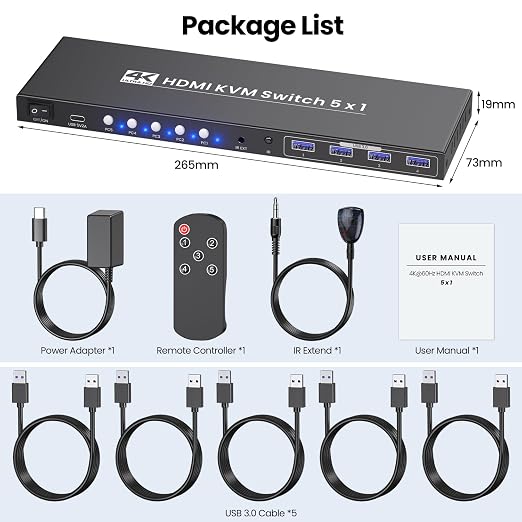
1. 5 Port KVM Switcher
2. IR Remote Controller
3. IR Extension Cable
4. USB 3.0 Cables
5. Power Plug
6. User Manual
Share