CoreDrive
21.5 Inch Touchscreen Monitor VA 3000:1 Contrast PC Touch Screen 100% sRGB | Height/Pivot/Swivel/Tilt Adjustable Computer Touch Display FHD 1920x1080P 75Hz HDMI VGA Type-B Built-in Speakers VES
21.5 Inch Touchscreen Monitor VA 3000:1 Contrast PC Touch Screen 100% sRGB | Height/Pivot/Swivel/Tilt Adjustable Computer Touch Display FHD 1920x1080P 75Hz HDMI VGA Type-B Built-in Speakers VES
Couldn't load pickup availability
- Monitor Screen Protective Film: In order to protect the screen, a protective film is attached to it. There is a folded corner of the protective film at the upper right corner of the screen, making it easy to peel off the film before use. You can remove the protective film before using the monitor. - Portrait and Landscape Mode with -90° to +90° Rotation: PLEASE NOTE: The screen display of the 21.5 inch touchscreen monitor does not support automatic rotation. Before using the monitor in portrait mode, you need to set the display from "landscape" mode to "portrait" mode or "portrait (flip)" mode in the display settings first, and then you can use the monitor's portrait mode. - 21.5 Inch Touch Display for Comfortable Operation: Designed with a spacious touch display and Full HD 1920 x 1080P resolution, this monitor provides clear visuals and comfortable operation for both daily productivity and commercial interaction. The larger screen size is ideal for POS systems, office desks, retail counters, reception areas, interactive software, and PC-based touch control. The 10-point multi-touch function supports smooth tapping, swiping, dragging, zooming, and multi-finger gestures. - Height, Pivot, Swivel and Tilt Adjustable Stand: The ergonomic stand supports height adjustment, pivot, swivel, and tilt, helping you adjust the screen for different users, desk heights, and working angles. Whether used on a reception desk, checkout counter, or office table, it helps create a more comfortable touch and viewing experience. - 100% sRGB and 3000:1 High Contrast VA Panel: This 21.5 inch touch screen monitor features 100% sRGB color gamut and 3000:1 contrast ratio, and a VA panel for vivid color, clear text, and deeper image contrast. It is suitable for spreadsheets, POS menus, product displays, video playback, and everyday multimedia use. Low blue light and flicker-free technology can effectively relieve eye fatigue after prolonged viewing. - 178° Wide View Angle Full HD 1080P Touch Monitor: Bring touch control, flexible adjustment, and clarity display performance to your workspace with this 21.5 inch touchscreen monitor for smooth everyday use, clear text, vivid images, and reliable touch interaction. Full HD 1920 x 1080P resolution with responsive 10-point multi-touch operation for a more intuitive way to work. Refresh Rate: 75Hz | Brightness: 250cd/m² - Dual 5W Built-in Speakers and Clean Cable Management: Dual 5W built-in speakers provide convenient audio for meetings, training videos, presentations, alerts, customer interaction, and daily multimedia use. The cable management function helps keep cables organized and creates a cleaner, more professional desktop or counter setup. - HDMI & Type-B & VGA Ports with 75x75mm VESA Mountable: Please connect the Type-B port via a Type-A to Type-B cable to get touch functionality of this 24 inch touchscreen monitor. MUST NOTE: Due to system limitations, the touch function does not supported on Apple devices, gaming devices, Linux systems and XP systems. 75 x 75mm VESA mountable for flexible installation.
Product description
178° Wide View Angle 21.5 Inch Touch Screen Monitor
Height, Pivot, Swivel and Tilt Adjustable
How to install the monitor
21.5 Inch Touch Display for Comfortable Operation
Height/Povit/Swivel/Tilt Adjustable Ergonomic Stand
Portrait and Landscape Mode with -90° to +90° Rotation
Monitor adjustable stand
Dual 5W Built-in Speakers and Clean Cable Management
Dual 5W speakers
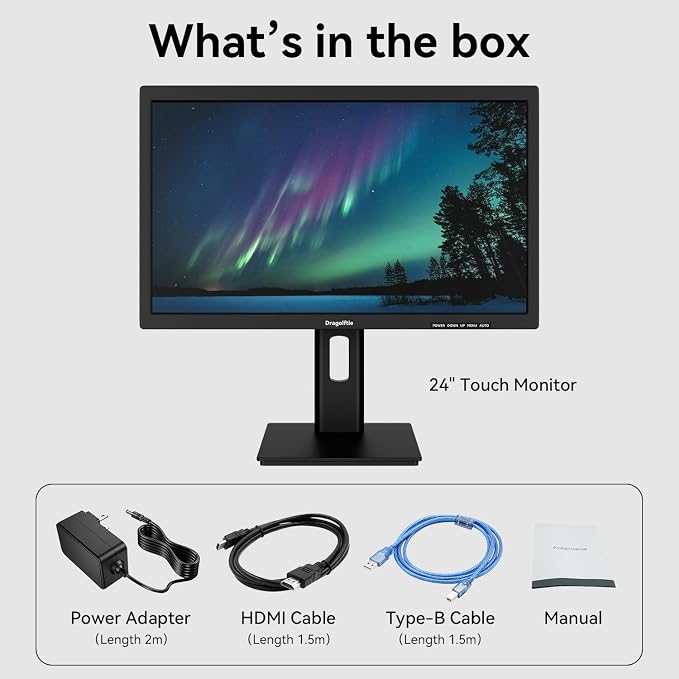
Package Included
What's in the box
HDMI VGA Type-B | VESA 75x75mm
How to connect to the monitor
Why the touch function does not work after connecting the 21.5 inch touchscreen monitor?
Why there is no touch function after connected the 21.5 inch touchscreen monitor correctly?
Why the built-in speakers does not work after connecting the 21.5 inch touchscreen monitor?
How to use the buttons to adjust the 21.5 inch touchscreen monitor?
What should I do if the 21.5 inch touchscreen monitor flickers or fails to turn on?
In order to protect the screen, a protective film is attached to it. There is a folded corner of the protective film at the upper right corner of the screen, making it easy to peel off the film before use. You can remove the protective film before using the monitor.
How To Install The Monitor
1. Align the monitor stand with the base buckle, fasten it tightly, then tighten the screws at the bottom of the base.
2. Fix the monitor stand to the back of the monitor with four screws. (Screwdriver is not included in the package.)
The ergonomic stand supports height adjustment, pivot, swivel, and tilt, helping you adjust the screen for different users. Whether used on a reception desk, checkout counter, or office table, it helps for more comfortable touch and viewing experience.
The 10-point multi-touch function supports smooth tapping, swiping, dragging, zooming, and multi-finger gestures, provides clear visuals and comfortable operation for both daily productivity and commercial interaction.
PLEASE NOTE: Due to system limitations, the touch function of this 21.5 inch touch monitor does not supported on Apple devices, gaming devices, Linux systems and XP systems.
PLEASE NOTE: The screen display of the 21.5 inch touchscreen monitor does not support automatic rotation. Before using the monitor in portrait mode, you need to set the display from "landscape" mode to "portrait" mode or "portrait (flip)" mode in the display settings first, and then you can use the monitor's portrait mode.
Dual 5W built-in speakers provide convenient audio for meetings, training videos, presentations, alerts, customer interaction, and daily multimedia use. The cable management function helps keep cables organized and creates a cleaner, more professional desktop or counter setup.
1x 21.5 inch touch monitor, 1x Power Adapter( Length 2m), 1x HDMI Cable(Length 1.5m), 1x Type-A to Type-B Cable(Length 1.5m), 1x Manual.
Please connect the Type-B port via a Type-A to Type-B cable to get touch functionality of this 21.5 inch touchscreen monitor. MUST NOTE: Due to system limitations, the touch function does not supported on Apple devices, gaming devices, Linux systems and XP systems.
Why the touch function does not work after connecting the 21.5 inch touchscreen monitor?
1. Please connect your device to the monitor’s Type-B port via a Type-A to Type-B cable.
2. Due to system limitations, the touch function does not supported on Apple devices, gaming devices, Linux systems and XP systems.
Why there is no touch function after connected the 21.5 inch touchscreen monitor correctly?
This may be due to interference with the monitor’s touch signal transmission. You can try unplugging the Type-A to Type-B cable and then reconnecting it; this should effectively eliminate the signal interference.
Why the built-in speakers does not work after connecting the 21.5 inch touchscreen monitor?
1. Please connect the monitor’s HDMI port via a HDMI cable. The built-in speaker functionality is not available when connected via the VGA port
2. Please set the audio output on your device to the monitor speakers
How to use the buttons to adjust the 21.5 inch touchscreen monitor?
1. Click the MENU button.
2. Click the UP and DOWN buttons to select.
3. Click the MENU button to enter options.
4. Click the UP and DOWN buttons to adjust function parameters.
5. Click the AUTO button to exit.
What should I do if the 21.5 inch touchscreen monitor flickers or fails to turn on?
1. Please check if the monitor's power adapter is faulty, you can try to use a new power adapter to connect this monitor.
2. Please check if the HDMI cable is faulty, you can try to use a new HDMI cable to connect this monitor.
Share