CoreDrive
2026 Upgraded AI Voice Mouse - Wireless Air Mouse with AI Voice Assistant 12 Languages Translation Meeting Transcription & Summary - Detachable Computer Mouse Presentation Clicker for Laptop
2026 Upgraded AI Voice Mouse - Wireless Air Mouse with AI Voice Assistant 12 Languages Translation Meeting Transcription & Summary - Detachable Computer Mouse Presentation Clicker for Laptop
Couldn't load pickup availability
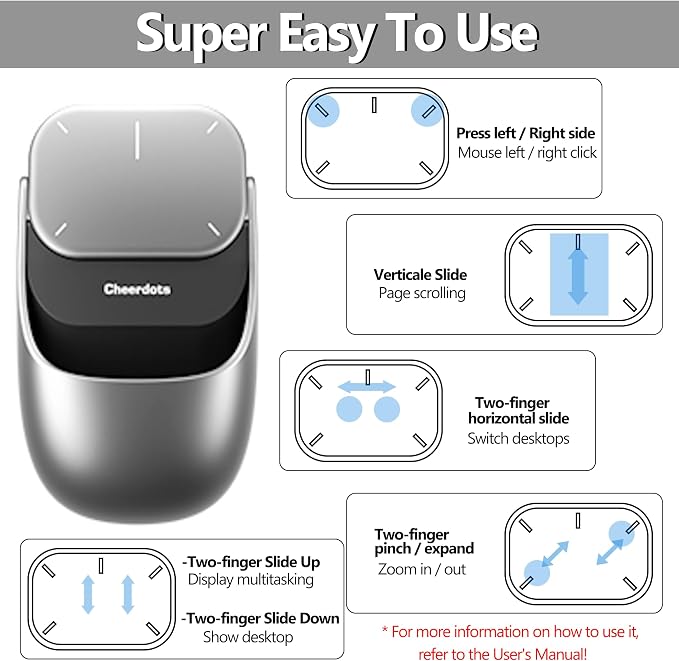
- [2026 UPGRADED AI MOUSE] Revolutionize your mobile office with a 2-in-1 work design. In Desktop Mode, use it as a mouse with touchpad support. Switch to Air Mode to transform it into a handheld presentation remote. Perfect for professionals who transition between desk work, meetings, and boardroom presentations without carrying multiple devices. - [YOUR AI MEETING SECRETARY: RECORD, TRANSCRIBE, SUMMARIZE] Never miss a detail again. With a single click, start meeting recording and let the software transcribe speech to text and automatically generate concise Meeting Summaries and Key Points. Export PDFs on your computer, or scan the QR code on screen to share content to your phone. Files are stored in the location you set, helping protect your privacy while your smart mouse handles the meeting workflow?ideal for professionals, journalists, and students. - [PROFESSIONAL PRESENTATION MASTER WITH SPOTLIGHT] Command the room confidently. In Air Mode, use intuitive touch gestures to control slides, scroll pages, and manage volume from across the room. Features laser and Digital Spotlight/Magnifier presentation functions (Driver required), and you can double-click the laser button to switch between Air Mouse, Spotlight, and Digital Light Mode. It also supports Professional PPT Mode through the driver, helping highlight key details more clearly on LED/LCD displays. - [INTEGRATED CHATGPT VOICE ASSISTANT] Experience the power of AI at your fingertips. The dedicated AI button can wake or hide the GPT dialog box for ChatGPT voice Q&A, GPT conversation mode, and GPT mode. Ask questions, draft emails, translate languages, or rewrite documents using voice commands. It supports 12 language options, and GPT mode does not require a subscription, but internet access is required for AI features. - [LONG-LASTING POWER & BLUETOOTH 5.0 CONNECTION] Engineered for the long haul. A single charge provides more than 25 days of use. Connects via Bluetooth 5.0, supports Windows, macOS, and Linux systems. The compact hard-shell body weighs only 70g (±3g) and measures 60 × 41 × 16 mm, making it suitable for portable office and mobile work scenarios. - [CUSTOMER SUPPORT & 1-YEAR WARRANTY] Your satisfaction is our top priority. This product comes with customer support and a 1-year warranty; if the product malfunctions due to a covered issue within the warranty period, we will replace it to protect your purchase with more confidence.
Product description
AI Wireless Mouse
How is OIKKEI AI Mouse different from a regular wireless mouse?
Is OIKKEI Mouse only a mouse, or is it an AI office assistant?
Can OIKKEI wireless smart mouse replace my everyday Bluetooth mouse?
Can OIKKEI Mouse record meetings and transcribe speech?
Is OIKKEI mouse better than a normal mouse for business travel?
How is OIKKEI AI Mouse different from a regular wireless mouse?
OIKKEI Mouse is more than a wireless mouse. It combines a Bluetooth mouse, touchpad, presentation remote, voice recorder, and AI office assistant for mobile work, meetings, presentations, voice input, and AI productivity.
Is OIKKEI Mouse only a mouse, or is it an AI office assistant?
OIKKEI Mouse works as a mouse but is built as a portable AI office assistant, adding touchpad gestures, Air Mode cursor control, presentation tools, voice-to-text, GPT voice interaction, meeting recording, and automatic summaries via software.
Can OIKKEI wireless smart mouse replace my everyday Bluetooth mouse?
Yes. OIKKEI Wireless Mouse works as a Bluetooth mouse for clicking, scrolling, browsing, and laptop control. OIKKEI smart mouse adds touchpad gestures, Air Mode, presentation control, recording, voice-to-text, and AI assistant features.
Can OIKKEI Mouse record meetings and transcribe speech?
Yes. With the software, OIKKEI AI Mouse can record meetings, convert speech to text, and generate summaries and key points.
Is OIKKEI mouse better than a normal mouse for business travel?
OIKKEI Mouse is ideal for business travel: compact, lightweight, and multifunctional. Instead of carrying a mouse, clicker, recorder, and voice input tool, use it as a Bluetooth mouse, air mouse, presentation remote, and meeting recorder.
Share