CoreDrive
14 Laptop Screen Extender Triple Monitor Laptop Extender [1 Cable for Dual Monitors ] 1200P FHD 360° Rotation Screen Portable Monitor for 13-17 Laptops with USB-C /2 USB-A (MacOS Wins)
14 Laptop Screen Extender Triple Monitor Laptop Extender [1 Cable for Dual Monitors ] 1200P FHD 360° Rotation Screen Portable Monitor for 13-17 Laptops with USB-C /2 USB-A (MacOS Wins)
Couldn't load pickup availability
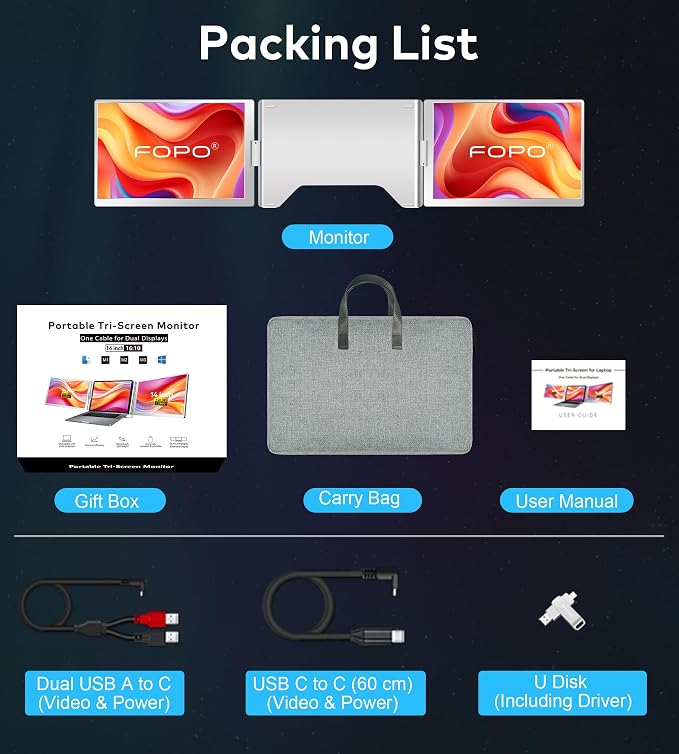
- 14" LAPTOP SCREEN EXTENDER: FOPO laptop monitor extender is designed for desktop placement, compatible with Windows and macOS (including M1, M2, M3), widely used for all 13”-17” laptops. This triple monitor supports 0-360 degree screen rotation, which fully meets your needs in multitasking and screen sharing and presentations, increasing efficiency by 300%. Ideal for home offices, remote workers, travelers, online meetings, IT workers, stock traders, designers and anyone who needs a more efficient workflow! - 1 CABLE CONNECTION: FOPO S688 laptop extender is easy to connect, just need your laptop has USB-C or 2 USB-A ports, first install the driver included in the package, then use the cable included in the package according to the interface of your laptop to realize easy to connect with just 1 cable. No need to worry about complicated cables anymore, save more space on your desktop and enjoy your efficient work mode easily and quickly. - AMAZING SCREEN DISPLAY QUALITY: Triple laptop screen extender adopts 16:10 full metal frame screen, elegant and high quality.FHD 1920*1200P high resolution, 100% sRGB high color gamut, accurately reproduce the richness of color, the button on the top of the screen allows you to manually adjust the brightness, presenting you with a brighter, more vivid and lifelike image. - LIGHTWEIGHT & PORTABLE: This triple portable monitor for laptop is designed to be lightweight, compact and collapsible, weighing only 3.15lb and 1.11inch thick, and we include a carrying case to take it on the go. It is an indispensable portable workstation for outdoor workers, remote workers, travelers and other busy people in outdoor work. - YOU WILL GET THE COMPLETE SET: 1*monitor, 1*Exquisite packaging Box, 1*Carry Bag, 1*Dual USB A to C (120 cm) (Video & Power), 1*USB C to C (60 cm) (Video & Power), 1*U Disk (lncluding Driver), 1*Quick Guide, 1*User Manual. If you are confused about compatibility and connections, please find us on the package or in the user manual. - PLEASE ENSURE COMPATIBILITY: 1. Does your laptop allow the installation of laptop triple screen extender connectivity driver, if not, it is not suitable. 2. Does your laptop have 1 USB-C or 2 USB-A ports. If you are not sure, please consult customer service.
Product description
FOPO 14" Laptop Screen Extender
How to use Setup portrait mode?
There is a boot LOGO, but no display after connecting to Macbook, how to solve it?
How to deal with the black screen, no display, or screen flickering, or intermittent black screen after connection?
Why does the video recording window appear when installing the driver?
How to use Setup portrait mode?
After making sure that the laptop monitor extender is connected successfully, then check the screen you want to control in your laptop's display settings page, and then select the screen display orientation.
There is a boot LOGO, but no display after connecting to Macbook, how to solve it?
Check if the driver icon is on the top right of the laptop desktop; If it is not displayed, please enter the laptop startup platform to find the driver and click it to solve the problem.
How to deal with the black screen, no display, or screen flickering, or intermittent black screen after connection?
Please make sure that the power board indicator light is on, and then check whether both ends of the connection cable are connected properly. Try to connect an external power source (USB-C charger or DC 5V3A or PD charger) to the device.
Why does the video recording window appear when installing the driver?
MacOS laptops need to install the driver manually, due to the MacOS system's inherent ability to project the system, it will show the recording window, this is caused by the system, not the driver recording the screen.
Share