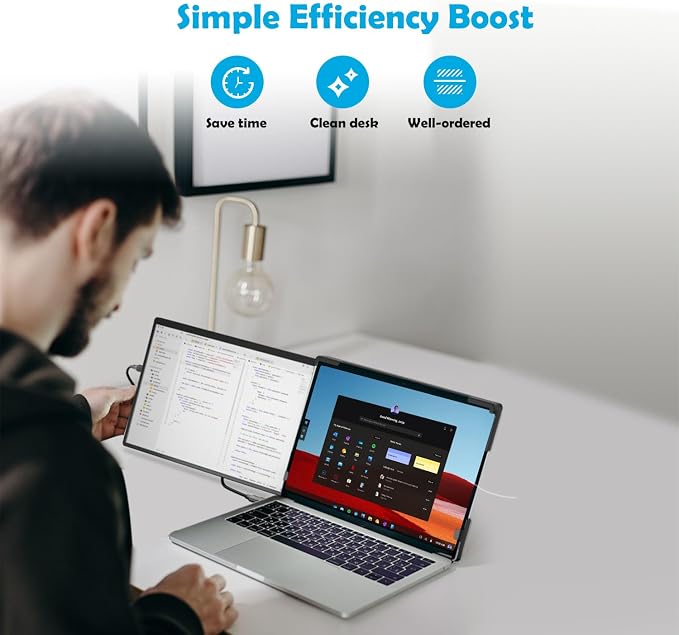
- ?? 2K Dual-Screen Productivity ? Upgrade your laptop with the XJCIX 14 inch 2K dual screen portable laptop monitor extender. Featuring 2240x1400 QHD IPS display, 100% sRGB color, 500 nits brightness, and ultra-wide viewing angles, it delivers sharp, vibrant visuals for multitasking, coding, video editing, content creation, gaming, and work from home.
- ? Plug & Play USB-C,Compatible with HDMI ? Instantly expandable without drivers. Compatible with HDMI and USB-C connections, simply connect via them to create dual-screen external displays. Compatible with 13-17-inch laptops, Compatible with Windows Laptop, compatible with MasOS notebook, it can flexibly meet professional and entertainment needs.
- ?? Portable & Travel-Friendly ? Lightweight and compact with a retractable foldable stand, this detachable dual monitor for laptop easily fits into a bag. Ideal for business trips, classrooms, coffee shops, remote work, or gaming on the go, offering a flexible and ergonomic dual-screen setup anywhere.
- ?? Flexible & Adjustable Design ? The interchangeable left-right mounting allows customized placement, while rotatable and foldable construction ensures comfortable viewing. Screens can be used independently or together for presentations, collaboration, multitasking, streaming, or gaming, enhancing flexibility and efficiency.
- ?? Work & Play Anywhere ? With 360° vertical rotation, 210° horizontal adjustment, 16.7M colors, and 60Hz refresh rate, this dual-screen portable monitor extender delivers an immersive, ergonomic, and smooth visual experience. Perfect for professionals, students, digital nomads, gamers, and content creators, turning any laptop into a powerful dual-screen workstation.
Product description
14" 2K IPS Dual Screen Portable Laptop Monitor
XJCIX 14" 2K Portable Laptop External Monitor
Attach the portable monitor to the laptop
Installing a Portable Monitor on a Laptop
XJCIX 14" 2K Portable Laptop External Monitor
Arrangement settings for landscape, portrait, and spanned modes
Settings for landscape, portrait and collage modes
XJCIX 14" 2K Portable Laptop External Monitor
Windows and Mac OS Driver Installation and Settting
Windows And Mac OS Installation and Setting Videos
XJCIX 14" 2K Portable Laptop External Monitor
The laptop connects to the portable screen via USB-A and HDMI interfaces
Connect The Portable Screen Via The USB-A and HDMI
XJCIX 14" 2K Portable Laptop External Monitor
The laptop connects to the portable screen via a USB-C docking station
Connect a portable monitor via USB docking station
XJCIX 14" 2K Portable Laptop External Monitor
Unboxing video
Unboxing Video of the Dual-Screen Portable monitor
Connection Method
The XJCIX XJ-142-14WB is a 2K portable dual-screen laptop extender that enhances productivity and mobile multitasking. This 14-inch 1400P IPS display, designed for 13-17.3" laptops, features 2240x1400 resolution and 100% color gamut, delivering sharp, vibrant visuals in any environment.
The portable dual-screen supports extend mode (Different content), mirror mode (Same content), vertical display, and smart device extension mode. (Note: Some modes require driver support, and installing the driver is very easy; it is recommended to install the driver.)
This video is suitable for 13?17.3 inch laptops with two USB-C ports (if there is only one portable screen, only one USB-C port is required). In the video, we will explain how to install and connect a portable screen to a laptop, and how to configure the basic settings.
This video explains how to set up a portable screen after it is connected to a laptop. Using the Windows system as an example, it demonstrates how to configure the portable laptop as an extended monitor in landscape, portrait, and mosaic modes, and explains how to adjust the settings.
This video demonstrates the installation and setup of Windows/macOS drivers for portable monitors, allowing flexible adaptation to multiple usage scenarios.
This video explains how to connect dual portable monitors to a laptop using USB-A and HDMI ports. Since many older laptops do not have USB-C/Type-C ports and only feature USB-A and HDMI ports, we provide a solution for connecting portable monitors through USB-A and HDMI interfaces.
This video explains how to use the included USB dock to connect dual portable monitors to a laptop with a single USB-C port, and how to set up the parameters for the portable displays. This solution is compatible with both Windows and macOS systems.
Unboxing Video of the Dual-Screen Portable Laptop Expander
Whether you’re a content creator, programmer, stock trader, or student, this dual portable monitor setup provides a seamless, ergonomic, and immersive viewing experience, turning your laptop into a powerful productivity tool anytime, anywhere.
This portable dual latop monitor extender supports the most commonly used USB-C and HDMI inputs, and has 2 USB-C/Type-C ports and 1 Mini HDMI port, allowing for flexible input of various video signals.
The USB-C/Type-C and HDMI interfaces of the portable notebook screen expander can achieve various connection methods with Windows and iOS driver software. Please confirm that your laptop's interface meets the above requirements before purchasing.
Package List : 1 × 14-Inch 2K Display Extender + 1 × Folding Stand + 1 × Mini HDMI to HDMI Cable + 1 × Type-C to Type-C Cable + 1 × Type-A to Type-C Cable + 1 × USB Extension Cable + 1x Handbag + 1 x User Manual.(Note: This product does not include laptops)