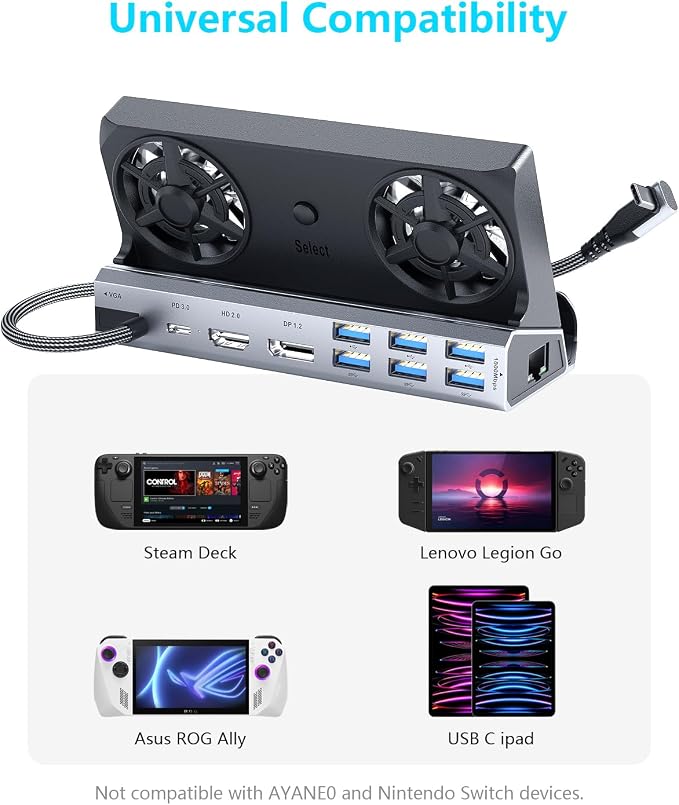
- Say Goodbye to Frame Drops & Overheating ? Dual RGB Cooling Fans When gaming, heat builds up and the system automatically reduces performance, causing lag and stuttering. This dock features dual 5cm RGB cooling fans that blow powerful airflow directly onto the back of your device, rapidly reducing heat so your handheld runs at full speed continuously ? while also extending battery life. A rear fan switch lets you turn off both fans and RGB in winter, saving energy.
- 12-in-1 Full-Function Dock ? Everything You Need Transforms your Steam Deck’s USB-C port into: HDMI 2.0 (4K@60Hz), Gigabit Ethernet (1000Mbps), 3×USB 3.0 (5Gbps), 3×USB 2.0, Type-C PD 3.0 (100W charging + 40Gbps data). Connect your TV, wired internet, keyboard, mouse, and USB drives all at once ? fast charging and high-speed data simultaneously.
- Wide Compatibility ? Handhelds, Laptops, Phones & More Compatible with: Steam Deck (OLED/LCD), ASUS ROG Ally, Lenovo Legion Go, Nintendo Switch 1&2, laptops, iPads, Android devices, and any USB-C device. Devices ≤27mm thick fit into the dedicated slot; thicker devices connect via the included Type-C cable. Note for Switch 1&2: Video output and charging work perfectly. USB data is limited by Nintendo (applies to all docks).e.
- 4K@60Hz Output + Gigabit Ethernet ? Smooth Big-Screen Gaming,HDMI 2.0 delivers sharp 4K@60Hz visuals on external monitors. The Gigabit Ethernet port provides stable, high-speed wired networking, drastically reducing lag in online multiplayer. For 4K resolution, manually adjust settings in game properties.
- Bonus Accessories Included ? 2 Pairs of Joystick Caps + 40Gbps Type-C Extender,Joystick caps improve grip and protect sticks from wear. The Type-C extender plugs into your console’s only USB-C port ? frequent plugging/unplugging will wear out the cheap extender instead of your expensive console’s port, saving you costly repairs.
- Aviation-Grade Aluminum Unibody ? Premium Build for Better Cooling,No visible screws, integrated design. Except for the fan area, most parts are made of high-strength aviation aluminum alloy (not plastic) ? stronger, more durable, faster heat dissipation, and a premium feel. The open fan area ensures superior airflow. Built for gamers who demand performance and longevity.
Product description
Why do external devices such as mouse and keyboard not work?
Support ROG ALLY Turbo 30W mode?
How to make sure the output is 4K@60Hz?
Why does the TV can't recognize my sound barrier and deactivate the CEC device?
How to use the storage function of the Steam Deck docking station correctly?
Why do external devices such as mouse and keyboard not work?
3 steps to check: 1. Restart your Steam deck and connect again when you connecting at the first time. 2. Connect the power adapter to provide sufficient power supply. 3. Make sure your Steam Deck has the USB driver installed.
Support ROG ALLY Turbo 30W mode?
Yes. This YCE ROG ALLY dock perfectly supports Turbo 30W mode, But you should use 65W or above charger.
How to make sure the output is 4K@60Hz?
Please make sure HDMI to HDMI 2.0 or over 2.0 version,cable shorter than 15 feet in length. Please manually debug to desktop mode and set 4K@60Hz output. If necessary, you will also need to set it up in-game.
Why does the TV can't recognize my sound barrier and deactivate the CEC device?
In Steam settings, click on audio, there is output, click on "external device", and you can transfer audio to your TV.
How to use the storage function of the Steam Deck docking station correctly?
Adjust from game mode to desktop mode, open the system tray and see the latest inserted memory card at bottom. The storage function in desktop mode can be used normally on steam deck.