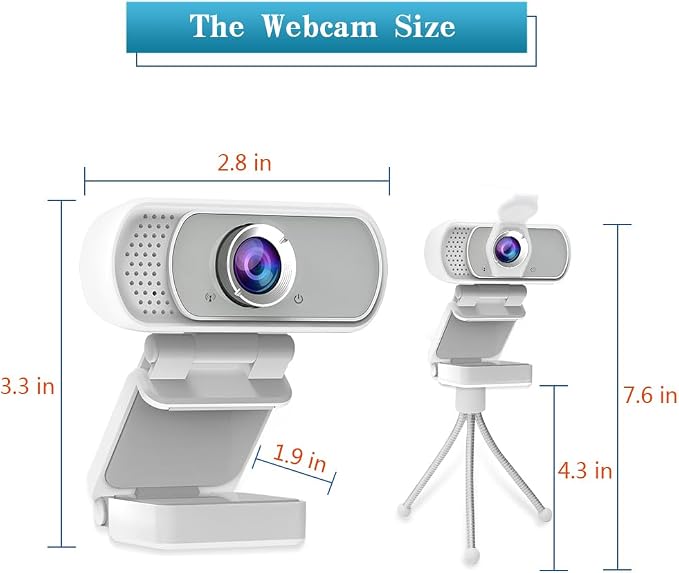
- AUTOMATIC CORRECTION: Our 1080P Full HD webcam delivers razor-sharp video at 30fps, so you always look your best during important meetings, job interviews and video calls. Advanced H.264 compression ensures smooth streaming even with slow internet, and automatic light correction fixes dark, grainy footage in any lighting condition.
- NOISE REDUCTION: Our built-in noise-canceling microphone filters out keyboard clicks, fan noise and other distractions, so your voice comes through loud and clear up to 10 feet away. The 110-degree wide-angle lens captures everyone in the room, making it perfect for family calls, team meetings and webinars.
- WIDE-ANGLE LENS: No complicated drivers, no confusing software, no hassle. Just plug the webcam into your USB port and it's ready to use. The flexible universal clip fits securely on any laptop, desktop or monitor, and the built-in tripod thread lets you mount it on a tripod for the perfect viewing angle.
- HIGH COMPATIBILITY: Our webcam works with all your favorite platforms: Zoom, Teams, Skype, Google Meet, YouTube, Twitch, OBS and more. Compatible with Windows, Mac, Chrome OS and Android devices. Whether you're working from home, teaching online or streaming games, this webcam has you covered.
- PRIVACY PROTECTION: Protect yourself from unwanted surveillance with the included sliding privacy cover. When you're done using the webcam, just slide it closed and rest easy knowing no one can see you. We also include a free mini tripod for flexible placement. Buy with confidence - if you have any problems, we're here to help.
Product description
Will this work in Whatsapp video?
Will this webcam work with macOS? Do I need to install any driver?
Is there any additional/compatible application to this camera to lock the white balance settings?
Any option to reduce the wide angle view to a releatively smaller angle?
I have a microphone. Can I disable the webcam microphone?
HZQDLN 1080P WEBCAM
Auto Exposure
Fixed focus
Focal Length
Fixed focus
1080p@30fps
Frame Rate
4k@25fps/2k@30fps
110°
Wide Angle
75°
Plug and Play
Windows, macOS Linux
System
Windows, macOS Linux
Auto Exposure
Fixed focus
Focal Length
Fixed focus
1080p@30fps
Frame Rate
1080p@30fps
110°
Wide Angle
110°
Plug and Play
Windows, macOS Linux
System
Windows, macOS Linux
Up and down 160 degrees can be adjusted, with a tripod can be adjusted to any Angle.
The webcam has a built-in noise-cancelling microphone to provide a clear video experience.
110 degree ultra large wide Angle chip. (slightly fisheye effect)
Attached with the privacy shutter, protect your privacy, avoid awkward picture.
Attached is a 1/4 universal interface tripod.
Will this work in Whatsapp video?
Yes, HZQDLN webcam supports most video apps
Will this webcam work with macOS? Do I need to install any driver?
Yes, it works on macOS. It also supports Windows,Ubuntu, etc. The webcam is drive-free, plug and play
Is there any additional/compatible application to this camera to lock the white balance settings?
In OBS, go to Camera Properties > Configure Video to access it
Any option to reduce the wide angle view to a releatively smaller angle?
Unable to adjust wide Angle
I have a microphone. Can I disable the webcam microphone?
Yes, you can. Simply disable the webcam microphone on your system.