CoreDrive
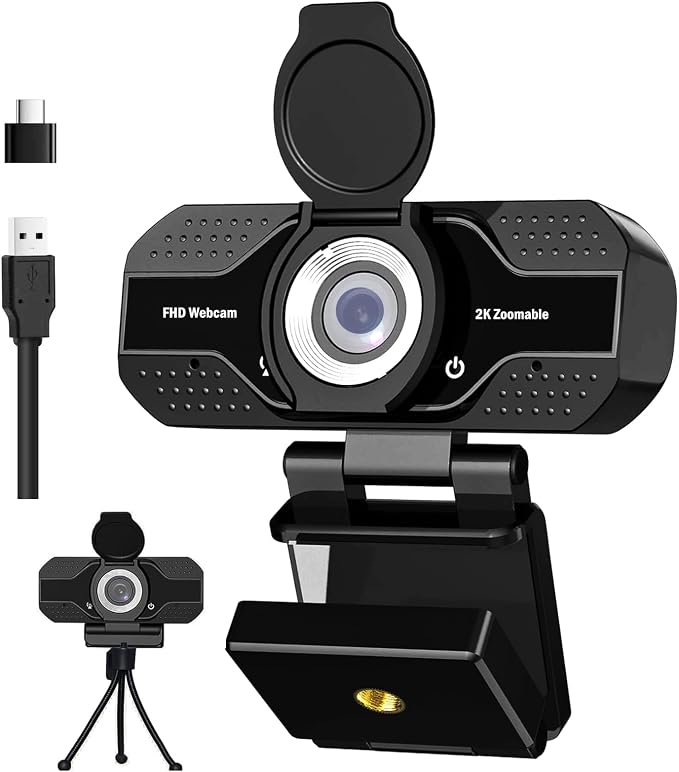
1080P HD Webcam with Microphone Noise Cancellation Privacy Cover Wide-Angle Lens Auto Light Correction Plug & Play USB Webcam for Laptop Desktop PC Zoom Skype Stream
1080P HD Webcam with Microphone Noise Cancellation Privacy Cover Wide-Angle Lens Auto Light Correction Plug & Play USB Webcam for Laptop Desktop PC Zoom Skype Stream
Couldn't load pickup availability
- 【Compact 4k/2H/1080p High Definition Webcam】: Our computer web camera has upgraded optics and a 120 degree wide angle lens with 5 layers of anti glare coating that reduces lens flare and ghosting; it is also equipped with a CMOS sensor making the camera more energy efficient and effective creating a better viewing experience during meetings, live streams, gaming streams or recordings. - 【Noise Canceling Microphone】: This 1080p webcam features dual built in noise canceling microphones that reduces distracting background noise, designed for high quality and clear audio. Multiple Software Compatibility: This computer camera works with most computer operating systems including Windows XP, 7, 8 and 11, Mac OS, Android, Smart TVs; you can use any video conferencing or streaming software with the camera such as Facetime, Skype, Zoom, etc. - 【Plug and Play】: This easy to set up USB web camera can be installed with no additional software; the webcam also features a tripod ready adjustable universal stand with a USB 2.1 power cable so that you have the freedom to use the web cam with any device or console. - 【Multiple Software Compatibility】: This computer camera works with most computer operating systems including Windows XP, 7, 8 and 11, Mac OS, Android, Smart TVs; you can use any video conferencing or streaming software with the camera such as Facetime, Skype, Zoom, etc. - 【Package includes】: 1* 1080p HD webcam, 1* Tripod, 1*USB 2.0 cord, a 4 step quick start guide and a privacy cover; the privacy cover provides lens protection and allows you to cover the camera lens when not in use, this feature helps provide security and peace of mind when the camera is not in use; the 5 step quick start guide helps get you set up using the webcam within minutes.
Product description
4K UHD
1/2.55'' Sony Sensor
Advanced Features
Notes:
Designed with the standard UVC/UVA protocol USB connector so it can be used with nearly any device with a USB port. No need to download any other driver or software, just plug and play!
Featured a adjustable webcam tripod clip fits your multi-angle needs on computers, laptops, desktops and all flat surfaces.
Great for webinars, video conferencing, live streaming, etc. The built-in Noise-canceling microphone reduces ambient noise to enhance the sound quality of your video. Even in noisy surroundings you can capture the sounds you want.
Question: Why my computer couldn't recognize this webcam ?
Answer: If your computer has a built-in camera, please disable that one firstly. On Windows 10, right click the start button---go to device manager--- look for Cameras--- click on the little arrow next to it. You should see two devices, your integrated camera and the one you bought which says HD Camera. Right click on your integrated camera and you should be given an option that says disable device.
Question:
My computer has separate speakers for the sound, will this cause an echo with the camera?
Answer:
No. You can choose which speakers you want to use, which mic you want to use, and which video source you want to use from your computer... you are only able to choose one of each. You will not have the problem you are describing. You will only get an echo if there is another computer close by that is in the same meeting, etc., as you are. see less
Question:
Is it manual-focus or auto-focus?
Answer:
This webcam is manual-focus. You can rotate the camera lens to adjust the focusing. the pictures is more clear than auto focus webcam
Looking for more FAQ to troubleshoot issues ? Please go to our official website and search FAQ for YOUPECK webcams.
Share